
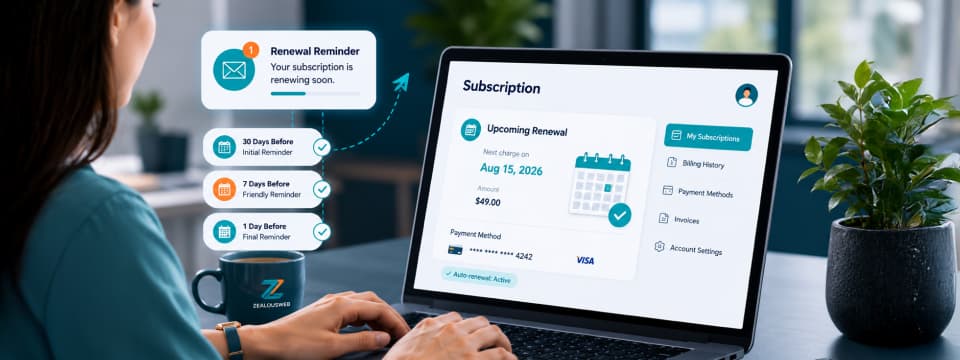
Renewals should feel simple, expected, and easy to follow. Customers should know what is renewing, when the charge will happen, and what to expect afterward.
Without timely communication, even a valid renewal can lead to:
- Surprise when a payment is processed
- Uncertainty about which subscription renewed
- Confusion around the renewal date or billing cycle
- Concern over outdated payment details
- No clear confirmation after payment
- Delayed action when a payment fails
That is why we developed an in-house Subscription Renewal Reminder Automation for our Magento-based plugin store.
The feature keeps customers informed before an upcoming charge and throughout the renewal process. It shares the plugin name, subscription details, renewal amount, debit date, available payment information, and payment status.
Instead of relying on a single notification, the system combines scheduled reminders, live subscription data, payment updates, duplicate prevention, administrative controls, and email logging to support a more thoughtful and dependable renewal experience.
Why We Built Subscription Renewal Reminder Automation
Auto-renewal keeps plugin subscriptions active without manual repurchase, but customers should still know when a charge is approaching.
The Subscription Renewal Reminder Automation provides timely updates on:
- Which plugin is renewing
- The renewal date and amount
- The available payment method
- Whether payment succeeded
- Whether any action is required
It is designed specifically for active auto-renewing subscriptions, helping customers stay informed without unnecessary promotional messaging or confusion.
How the Renewal Reminder System Works
The system automatically reviews active subscriptions approaching renewal and sends reminders only when the required conditions are met:
- The subscription is active
- Auto-renewal is enabled
- A renewal date is available
- The renewal amount is valid
- The customer email is available
- The subscription has not been cancelled
- The upcoming renewal has not already been paid
Cancelled, expired, inactive, already-paid, or incomplete subscriptions are excluded. Duplicate checks also prevent repeated reminders within the same renewal cycle.
Built With Live Subscription Data
Each message is generated using dynamic information from the subscription and payment system.
This may include:
- Customer name
- Plugin name
- Subscription ID
- Billing cycle
- Renewal amount
- Currency
- Renewal date
- Payment method
- Card details where available
- Subscription-management links
- Payment-update links
- Invoice links
- Customer account links
The values are not intended to be hardcoded. Before a notification is sent, the system must use the current information available in Magento and the relevant payment or subscription module.
This matters because subscription details can change. A renewal amount may be updated, a renewal date may move, or a payment method may no longer be available. Using live data helps the notification reflect the subscription as it currently stands.
Reliable Delivery and Internal Visibility
The automation maintains detailed email logs to track each notification’s status, timing, failure reason, and retry history. A uniqueness check using the subscription, renewal date, and email type also prevents duplicate reminders within the same renewal cycle.
Timely Reminders Before the Renewal Charge
The reminder sequence begins 30 days before the scheduled renewal.
Customers then receive additional reminders seven days before renewal and one day before renewal. These intervals are designed to provide useful advance communication without requiring customers to remember the renewal date themselves.
- 30 Days Before Renewal
The first reminder shares the plugin name, billing cycle, renewal amount, date, and available payment details. It gives customers time to review their subscription and confirm their billing information.
- 7 Days Before Renewal
The second reminder repeats the key renewal details closer to the scheduled date. No action is needed when everything is correct, but customers can still update their payment information if required.
- 1 Day Before Renewal
The final reminder confirms that the subscription will renew the next day and restates the expected amount and renewal date. Together, these reminders provide early notice, a timely check-in, and a final update before renewal.
What Customers Can Expect in Every Reminder
Each reminder shares only the most relevant subscription details, such as the plugin name, billing cycle, renewal amount, debit date, available payment information, and useful account or payment links.
Payment details appear only when available, helping avoid incomplete or misleading information. When everything is in order, no action is needed. If billing details require attention, customers can update them directly or review their subscription through the provided links.
How Advance Notice Improves the Renewal Experience
A renewal reminder is a small feature, but it can make a meaningful difference to the customer experience.
It Reduces Unexpected Charges
Customers receive notice before the scheduled debit date rather than learning about the renewal only after seeing a completed transaction.
The system specifically communicates the renewal amount and the date on which the amount is expected to be debited.
That advance communication supports greater awareness around the subscription.
It Helps Customers Stay Prepared
A customer may have changed cards, received a new card number, or stopped using a previously saved payment method.
A reminder gives them time to check these details before the payment is attempted. This can help prevent avoidable payment failures and reduce interruptions in access.
It Keeps the Renewal Process Convenient
Customers who are happy with their subscription do not need to complete an additional renewal process.
If the subscription details and payment method are correct, the auto-renewal can continue as scheduled. The reminders simply keep the customer informed about that process.
It Reinforces Ongoing Subscription Value
The renewal message can remind customers that an active licence supports continued access to relevant plugin updates, compatibility improvements, security fixes, support, and applicable feature releases.
This connects the renewal to the services and product value the customer continues to receive.
It Creates a More Considerate Experience
Proactive communication shows that renewal is not treated as an invisible background transaction.
Customers are given relevant notice before the charge and an update after the payment attempt. This makes the experience feel more thoughtful and complete.
Helping Customers Avoid Payment Disruptions
A failed renewal payment does not always mean that a customer no longer wants the subscription.
Payments can fail for practical reasons, including:
- An expired card
- Insufficient available balance
- A bank decline
- An outdated payment method
- Another payment-processing issue
The automation is designed to communicate these situations promptly.
If a renewal payment fails, the customer receives a notification with the relevant subscription details and a link to update their payment method.
If the issue remains unresolved, the system can send a retry reminder after three days and a final notice after seven days, subject to the configured settings and business rules.
This gives customers time to resolve the issue and helps prevent interruptions to plugin updates, support, security fixes, and other active-licence benefits.
What Happens After the Renewal Attempt
The communication does not stop once the renewal date arrives. Their next message depends on the payment result.
When The Renewal Is Successful
When the renewal payment is completed successfully, the system sends a confirmation email.
The message can include:
- Plugin name
- Amount charged
- Renewal date
- Next billing date
- Subscription ID
- Invoice link, where available
- Customer account link
It also confirms that the plugin licence remains active and that the customer will continue receiving the updates and support included in the subscription plan.
This confirmation provides reassurance that the renewal was completed correctly. The payment-success workflow may also update the subscription status, extend the licence validity, generate an invoice where applicable, send the confirmation, and save the email record.
When the Payment Is Unsuccessful
When the payment fails, the system keeps the subscription in the applicable pending or failed-renewal state and sends a failed-payment message.
It records the payment status, schedules follow-up communication according to the configured timing, and only deactivates the licence according to the existing business rules.
This prevents the customer from being left without an explanation. Instead, they receive a relevant update and a practical route to address the payment issue.
Conclusion
Unexpected subscription charges can create unnecessary stress, especially when customers are not given enough notice before a renewal.
The Subscription Renewal Reminder Automation reduces that uncertainty with timely reminders, relevant payment details, and post-renewal updates. It gives customers greater awareness of what is happening while supporting a smoother, more dependable subscription experience.
For ZealousWeb, thoughtful technology is not only about what a solution does-it is also about how responsibly it supports users after implementation. That same focus on intelligent automation, practical functionality, and better user experiences shapes all our plugins available at ZealousWeb Store.
Explore Smart Solutions Built by ZealousWeb
Browse Here
FAQs
Why did ZealousWeb introduce renewal reminders?
Because customers deserve to know before a renewal charge is processed. The feature provides timely notice, relevant subscription details, and greater confidence throughout the renewal journey-reflecting ZealousWeb's commitment to making every customer interaction feel considered, transparent, and valued.
What makes this renewal experience more dependable?
The system uses live subscription data, eligibility checks, duplicate prevention, and notification logs to support accurate, consistent communication.
Can customers review their renewal details in advance?
Yes. Reminder emails can include the plugin name, renewal amount, scheduled date, billing cycle, and payment information where available.
What happens after a renewal payment is processed?
Customers receive either a successful renewal confirmation or a payment-status notification explaining whether any action is required.
How does ZealousWeb help customers maintain uninterrupted access?
Timely reminders and payment updates allow customers to review their details and resolve payment issues before their subscription benefits may be affected