

Your business’s reputation is out there for everyone to see, and it matters more than ever. Online reviews are often the first thing potential customers check before deciding to trust you. One review can make a big difference in how people see your brand.
But getting great reviews is only part of the story. Thoughtful and timely replies demonstrate that you care about and value your customers’ feedback. They can turn a one-time buyer into a lifelong advocate or even help resolve issues before they escalate. However, managing these responses efficiently is easier said than done. Responding to every review manually takes time and resources that many businesses simply don’t have. Failing to respond or sending inconsistent replies can quickly damage your reputation.
There is also the risk of human error-missing critical reviews or responding with the wrong tone. This can make the task overwhelming. That’s why businesses need innovative tools and strategies to handle review management efficiently without losing the personal touch customers expect.
The Problem With Manual Review Replies
Traditionally, businesses would manually read each review, craft a personalized response, and post it individually. While this approach can feel personal and genuine, it’s often time-consuming and resource-intensive. It requires constant attention, which may result in multiple reviews going unanswered or receiving delayed responses. Worse still, human errors such as missed reviews, generic or inappropriate replies, or inconsistent tone can creep in.
Smart automation tools that analyze reviews and suggest tailored response options based on sentiment enable businesses to streamline the process without sacrificing personalization. This not only saves time but ensures replies are thoughtful, timely, and on-brand. Other key problems with manual review replies are:
- Responding individually to every review eats into valuable staff hours that could be better spent elsewhere.
- Requires dedicated personnel or teams, which may not be feasible for smaller businesses.
- Missed reviews or poorly worded responses can damage customer trust.
- Different responders may use varying styles, which can confuse customers or dilute brand identity.
- Slow replies reduce the impact of engagement and can frustrate customers.
To better understand the difference between manual and automated review replies, consider the example below, which showcases how responses vary by approach and customer sentiment.
| Review Rating | Customer Review | Manual Reply Example | Automated Reply Suggestion |
| 5 Stars ⭐⭐⭐⭐⭐ |
“Amazing service and friendly staff!” | “Thanks!” (Generic, brief) | “Thank you for your kind words! We’re thrilled you enjoyed our service.” |
| 3 Stars ⭐⭐⭐ |
“Product was okay, but delivery was late.” | “Sorry for the inconvenience.” (Late reply) | “We apologize for the delay and appreciate your patience. We’re working to improve delivery times.” |
| 1 Star ⭐ |
“Very disappointed. Customer support was unhelpful.” | (Missed reply or defensive response) | “We’re truly sorry for your experience. Please contact us directly so we can make things right.” |
Managing manual review replies is often time-consuming, but sentiment-based response suggestions simplify the process by helping you reply quickly and accurately.
What Are Sentiment-Based Review Response Suggestions?
Sentiment-based review response suggestions are an intelligent way to manage online reviews by analyzing the emotions behind customer feedback. This technology, known as sentiment analysis, scans the text and star rating of each review to understand whether the feedback is positive, neutral, or negative.
How Sentiment Analysis Works
- Text Evaluation: The system analyzes keywords and phrases to assess the overall tone of the review. For example, words like “excellent,” “friendly,” or “happy” suggest positive sentiment, while “disappointed,” “slow,” or “unhelpful” indicate negative feedback.
- Star Rating Correlation: It also considers the star rating to validate the tone. A 5-star review with positive words will trigger a different response suggestion than a 2-star review with complaints.
- Context Understanding: Advanced algorithms can even detect sarcasm, mixed emotions, or specific issues mentioned.
Example of Sentiment-Based Suggestion:
Customer Review:
“Very disappointed with customer support.”
Suggested Replies:
“We’re sorry to hear about your experience. Please contact us so we can make it right.”
or
“Thank you for bringing this to our attention. We’d like to help resolve the issue.”
It’s essential to recognize that these are suggestions, not fully automated responses. You or your team should still review and customize the response before posting. This approach combines the efficiency of automation with the personal touch that customers appreciate.
How Smart Suggestions Improve Your Review Management Workflow
Managing online reviews can quickly become overwhelming, especially as your business grows. Smart review response suggestions help simplify this process by streamlining workflows, reducing repetitive tasks, and ensuring every reply reflects your brand’s values.
Save Time and Reduce Repetitive Tasks
Responding to dozens or hundreds of reviews manually takes hours. Smart suggestions cut down this time by providing ready-made, sentiment-driven reply options that you can quickly select and personalize. Instead of starting from scratch with each response, you focus on reviewing and tweaking, speeding up your entire workflow.
Ensure Consistent Tone and Brand Messaging
When multiple team members handle review replies, maintaining a consistent tone can be challenging. Smart suggestions help standardize your responses by aligning them with your brand voice, ensuring every reply sounds professional and on-point, whether it’s a thank you or an apology.
Support Faster, More Thoughtful Responses
Quick replies demonstrate to customers that you’re engaged and genuinely care about their feedback. Smart suggestions allow you to respond promptly without sacrificing quality. This balance helps improve customer satisfaction and fosters stronger loyalty over time.
Additional Benefits of Smart Suggestions
- Easily manage growing volumes of reviews without increasing staff workload.
- Minimize risks of overlooked reviews or inappropriate replies.
- Provide a unified response framework that enables multiple team members to maintain a consistent approach to communication and collaboration.
- Some tools offer analytics on response patterns and trends in customer sentiment.
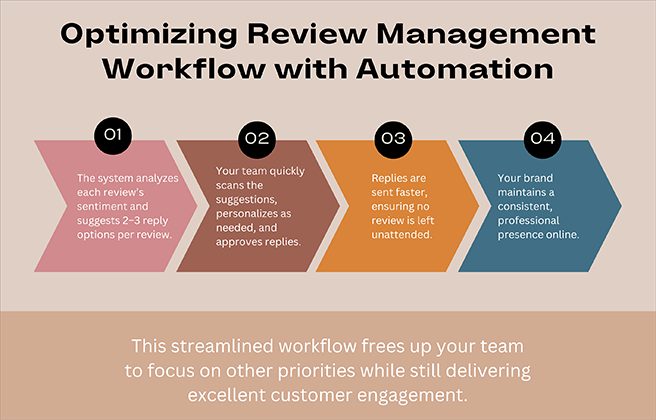
With innovative sentiment-based suggestions integrated into your review management system, the process becomes much smoother:
- Automatic Sentiment Analysis: Each review is instantly analyzed to determine its tone-positive, neutral, or negative.
- Tailored Reply Options: Based on this analysis, the system generates 2 to 3 thoughtful, on-brand response templates for each review.
- Quick Review and Personalization: Your team simply reviews these suggestions, makes any necessary tweaks to add a personal touch, and approves the response.
- Faster, Consistent Engagement: Replies are sent promptly, ensuring every customer feels heard while maintaining a consistent brand voice across all interactions.
This approach not only saves significant time but also enhances the quality and speed of your customer engagement, turning what was once a tedious task into a seamless part of your daily routine.
Here’s a quick look at how smart suggestions can transform your review response process, saving you time and boosting customer satisfaction.
A Practical Example: Auto-Reply Suggestions in WordPress Review Plugins
Managing online reviews can be complex; that’s why many businesses use specialized WordPress plugins to simplify the process. These plugins not only display your Google reviews on your website but also help you manage and respond to reviews more efficiently. One of the most effective features some plugins offer is auto-reply suggestions based on sentiment analysis.
ZealousWeb’s Smart Showcase is a versatile Google Reviews WordPress plugin designed to enhance your site’s credibility and simplify review management. Beyond beautifully displaying reviews in grids, lists, sliders, badges, and pop-ups, it offers robust admin tools, including reply forms, sorting filters, and notifications.
Key Features of Smart Showcase Plugin:
- Show reviews in various layouts on any device
- Filter and embed reviews by rating and location
- Admins can reply and get notified of new reviews
- Get smart reply suggestions based on sentiment
- Edit and personalize replies before publishing
- Compatible with major page builders and custom CSS
- GDPR-compliant with multilingual support

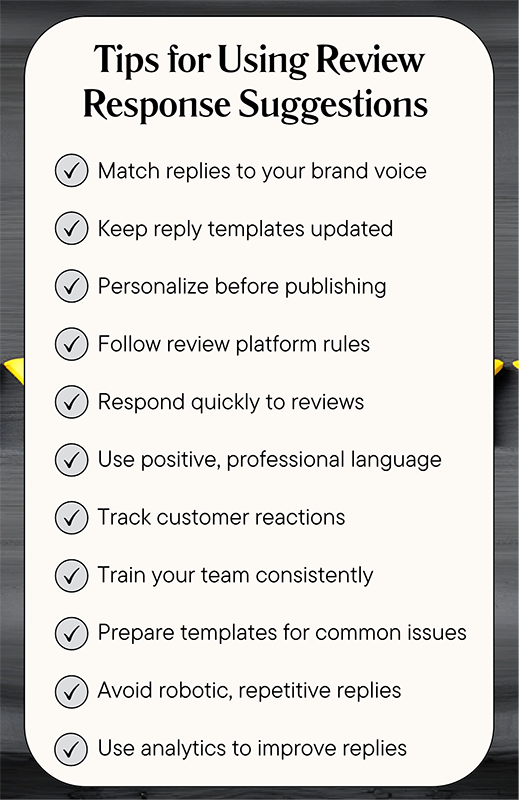
Tips for Using Review Response Suggestions Effectively
Using automated review reply suggestions can save you time and keep your responses consistent; however, to achieve the best results, it’s essential to follow some best practices. Use this checklist to ensure you’re maximizing your review management efforts.
Conclusion
You have done it, and you know that managing online reviews can feel like a full-time job. But with automated, sentiment-based reply suggestions, you don’t have to do it all yourself. These innovative tools help you respond quickly, maintain a consistent tone, and still add that personal touch your customers appreciate.
When you combine technology with genuine engagement, you turn every review into an opportunity to build trust and grow your brand. Tools like ZealousWeb’s Smart Showcase plugin make it easy to strike a balance between efficiency and authenticity, so your reputation shines and your business thrives.
FAQs
How Are Suggested Replies Generated?
Suggested replies are generated using sentiment analysis technology that evaluates the language and star rating of each review. This helps the system understand whether feedback is positive, neutral, or negative, and then offers appropriate, context-aware response options.
Can I Edit or Customize the Suggested Responses?
Yes. While the system provides reply templates based on the review's sentiment, you retain complete control to edit and personalize each response. This ensures your replies reflect your brand's unique voice and address specific customer concerns effectively.
Is the Process Fully Automated or Manually Controlled?
The process combines automation with manual control. Automated tools suggest responses quickly, but you or your team manually review and customize replies before publishing. This approach strikes a balance between efficiency and the personal touch that customers expect.
Do Suggested Responses Impact SEO or Customer Trust?
Replying to reviews doesn't directly boost SEO rankings, but it positively influences customer trust and engagement. Active, thoughtful responses signal that your business values feedback, which can lead to higher customer satisfaction and a better online reputation overall.


