



Every abandoned cart tells the same story — a shopper who wanted to buy, but didn’t trust the process enough to finish. And in the world of baby products, that hesitation is magnified. Parents aren’t browsing; they’re buying with urgency and emotion. If your checkout page slows them down or makes them second-guess, you lose more than a sale — you lose confidence.
That’s why your checkout experience isn’t just about design; it’s about trust architecture. The cleaner, faster, and more intuitive the journey feels, the stronger your credibility becomes. Parents want clarity, not clutter. They expect speed, not surprises. When they can glide from cart to confirmation without resistance, they don’t just remember your brand — they rely on it.
Think of it this way: your checkout UX does what great physical therapy marketing does — it removes friction, builds confidence, and earns long-term loyalty through care that feels effortless. Whether you’re running a small Shopify baby boutique or scaling a multi-brand marketplace, your checkout flow silently answers one question: Does this store respect my time?
So before you redesign your next product page or plan your next campaign, start where every parent’s journey ends — at checkout. Because that’s where convenience meets conversion, and where the choice between guest checkout and account creation can define your store’s future.
Understanding Parent Shoppers: The Psychology Behind Purchase Behavior
Behind every purchase in a baby product store lies a moment of urgency, care, and emotion. Parents don’t approach checkout as casual buyers — they shop with intent, juggling time pressure and trust in equal measure. That’s why understanding parent shopping psychology is the foundation of any successful eCommerce conversion strategy.
For your brand, this means one simple truth: every design decision, from the size of a “Buy Now” button to the visibility of a progress bar, must serve the parent’s state of mind. When your checkout UX mirrors how parents actually think, act, and decide, conversions rise — not by chance, but by design.
This section explores what drives a parent to complete or abandon a purchase: their high intent but low patience, the emotional triggers that shape buying behavior, and the UX friction that quietly breaks trust. By decoding these behaviors, you gain the insight to build checkout flows that feel faster, friendlier, and fully aligned with real human needs — the kind that turn first-time buyers into loyal brand advocates.
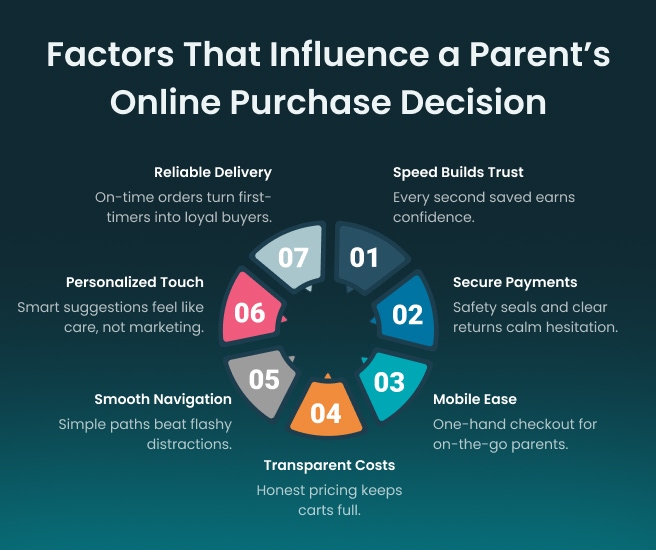
Why Baby Product Shoppers Are High-Intent but Low-Patience Users
Parents arrive ready to buy. They’ve researched, compared, and already trust your brand enough to add items to their cart. What they won’t tolerate is delay or confusion. Each second spent waiting or re-entering details risks abandonment.
Why this matters for your business:
- High intent needs high speed: A one-second delay in page load can cut conversions significantly.
- Mobile optimization is essential: Parents shop on phones — one-handed, often multitasking. Thumb-friendly layouts, larger buttons, and intuitive scrolling boost ease.
- Frictionless flow earns trust: A simple, transparent checkout reassures buyers that your brand values efficiency and care.
When your checkout design mirrors the urgency of parent shoppers, you build not only faster transactions but lasting confidence.
Emotional and Situational Triggers: Late-Night Shopping, Gifting, Urgent Needs
Parent shopping behavior is guided as much by emotion as practicality. Many purchases happen in fleeting moments — a late-night restock, a last-minute baby shower gift, or an urgent need for essentials. These are high-emotion, low-time scenarios where convenience wins every time.
How your UX can respond effectively:
- Design for calm: Gentle colors, uncluttered layouts, and fast-loading elements create comfort during late-night browsing.
- Support first-time buyers: Streamlined guest checkout and clear delivery options make gifting effortless.
- Build reliability through clarity: Prominent delivery timelines and return policies reassure anxious buyers.
Your interface should meet parents where they are — busy, distracted, but deeply intentional. When the experience feels effortless, emotion turns into trust.
What UX Friction Does to Conversions
Friction is the silent killer of eCommerce conversions. Parents don’t abandon carts because they’re uncertain about the product; they abandon them because your checkout makes it difficult to finish. Forced registrations, unclear progress, or extra form fields increase cognitive load — the opposite of a parent-friendly experience.
How friction removal drives measurable results:
- Higher conversion rates: Shorter forms and optional sign-ups lower abandonment rates.
- Better user confidence: Transparent pricing, visible support links, and clear progress indicators reduce anxiety.
- Improved retention: A smooth first checkout encourages repeat visits and builds lifetime customer value.
Eliminate friction, and your brand earns something far more valuable than a sale — it earns a shopper’s trust in your process.
UX/UI Foundations for a Frictionless Checkout
A frictionless checkout isn’t built on luck — it’s built on intention. Leading baby product brands understand that their UX and UI design aren’t just about visuals; they’re trust builders. Every color tone, button placement, and form field communicates how much a brand values its shoppers’ time and mindset.
A cluttered checkout tells parents, “This brand makes me work too hard.” A clean, mobile-first flow says, “We respect your time.”
For baby product eCommerce businesses, the right checkout UX design converts hesitation into confidence. This section outlines the core UX principles, mobile-first strategies, and real-world design insights that help modern baby stores look polished, load fast, and feel effortless to buy from.
Core UX Principles Every Baby Product Store Should Follow
In eCommerce, usability and empathy outperform aesthetics. Parents don’t care about animations or fancy graphics if checkout feels complicated. They care about speed, clarity, and trust.
Key UX principles to guide your design:
- Clarity over creativity: Use straightforward CTAs like “Proceed to Payment” and remove any step that delays completion.
- Visual hierarchy: Keep essential elements — order summary, payment button, delivery options — visible without scrolling.
- Consistency builds trust: Maintain uniform styles across pages to reduce mental strain.
- Error-proof interaction: Auto-validate fields and show instant feedback to prevent form frustration.
For instance, Carter’s checkout experience follows clear progress indicators and validates information in real time — a small yet powerful decision that reduces cart abandonment and builds user confidence.
Mobile-First Design, Form Simplification, Trust Signals, and Visual Reassurance
Parents shop while multitasking — during feeding, travel, or bedtime routines. That’s why a mobile-first checkout isn’t optional; it’s essential. The fewer clicks required, the higher the completion rate.
How to design for mobile clarity and reassurance:
- Single-column layout: Simplifies scrolling and prevents layout breaks on smaller screens.
- Autofill and one-tap payment: Integrate Apple Pay, Google Pay, and address auto-completion for faster input.
- Trust indicators: Include SSL certificates, visible payment logos, and a clear privacy statement to reinforce credibility.
- Visual calm: Use soft tones, open space, and legible typography to create a sense of ease.
Amazon’s one-click checkout remains the global benchmark — not because it’s flashy, but because it eliminates resistance. Baby product brands can achieve similar confidence by focusing on convenience and transparency.
Designing for Real-World User Behavior
The best checkout designs acknowledge real-life distractions. Parents often complete purchases with one hand or return later after interruptions. Designing for that reality builds brand dependability.
How to align design with real user behavior:
- Thumb-friendly controls: Position main CTAs where they’re reachable on mobile devices.
- Persistent sessions: Save cart contents and form data so users can resume anytime.
- Progressive forms: Reveal only essential fields first; unfold the rest step by step.
- Fast load experience: Optimize media and scripts — every second shaved boosts conversion potential.
FirstCry’s streamlined checkout uses minimal steps and quick re-entry points for returning users. The process takes under a minute, making it one of the most practical examples of frictionless UX in the baby retail space.
Design for how parents truly shop, not how designers hope they do. That’s how eCommerce stores turn ordinary transactions into smooth, trusted brand experiences.
Guest Checkout: Speed, Trust, and Instant Conversions
Nearly one in four shoppers abandon their cart the moment they’re forced to create an account — a costly UX mistake, especially in the baby product niche, where every second counts. Parents don’t want to “join.” They just want to buy.
Guest checkout removes that barrier and turns hesitation into momentum. It’s not a shortcut; it’s a conversion accelerator. By allowing purchases without commitment, you respect the shopper’s time, build trust faster, and create a smoother path to sale.
A well-designed guest checkout flow doesn’t just win transactions; it earns confidence. It’s your brand’s first promise that buying from you will always be simple, secure, and parent-friendly.
Why First-Time and Casual Buyers Prefer Guest Checkout
First-time visitors or gift buyers have little brand familiarity. Forcing them into registration feels like asking for commitment before trust is built. Guest checkout removes that psychological friction and lets them experience your service before deciding to stay loyal.
Why it works for baby product eCommerce stores:
- Low-commitment entry point: Ideal for new or gift-driven buyers who want speed over personalization.
- Reduced abandonment risk: Eliminating mandatory sign-up prevents the most common form of checkout drop-off.
- Faster trust-building: Shoppers experience your delivery, packaging, and service firsthand — the foundation of repeat business.
For example, BuyBuy Baby offers a single-step guest checkout that’s so seamless, most users don’t even notice they skipped account creation. The brand then strategically invites them to register after order confirmation — smart UX that converts curiosity into retention.
Key Design Elements: Progress Indicators, Auto-Fill, Payment Trust Cues
Speed alone isn’t enough — clarity, predictability, and security must walk alongside it. Every part of your guest checkout UX should reinforce trust and reduce mental effort.
Elements that drive frictionless conversions:
- Progress indicators: Show users how close they are to completion. Clear steps like “Cart → Delivery → Payment → Review” create control and transparency.
- Auto-fill and validation: Prepopulate fields with stored browser data or payment profiles to reduce effort.
- Trust cues at every stage: Display SSL badges, payment provider logos, refund policies, and transparent order summaries.
- Smart error handling: Inline messages like “Invalid card number” prevent frustration before it escalates.
Walmart’s checkout process is a strong reference here — progress bars, trust seals, and simple design all combine to make the transaction feel predictable and safe.
When Guest Checkout Drives Higher Conversion Rates — and Its Limitations for Retention
Guest checkout improves immediate conversion rates, but it’s not a long-term retention strategy on its own. While it minimizes cart abandonment and accelerates purchases, it limits your ability to personalize follow-ups, recommend products, or build loyalty programs.
The best-performing brands use guest checkout as a gateway, not a compromise.
How to balance speed with strategy:
- Offer guest checkout upfront to capture first-time buyers.
- Encourage post-purchase account creation with simple prompts like “Save your details for next time” or “Track orders easily with your account.”
- Use order confirmation pages to highlight loyalty points or faster future checkouts.
Guest checkout wins the first sale; your UX strategy decides if they return. A great checkout experience doesn’t just remove barriers — it opens the door to an ongoing relationship built on ease, trust, and consistent brand experience.
Account Creation: Retention Through Personalization
Fast checkouts bring the first sale. Personalization brings the second — and the tenth. Account creation isn’t about collecting emails; it’s about building continuity. In the baby product industry, where purchases are recurring by nature, an optimized account experience can transform one-time buyers into lifetime customers.
When parents log in and see saved addresses, tracked orders, and personalized suggestions for what their baby might need next, they feel understood — not sold to. That’s where loyalty begins. The goal is simple: design account creation as an invitation, not an interruption. When users see genuine value in staying connected, retention happens naturally.
How Stored Preferences, Loyalty Points, and Order Tracking Enhance Retention
Parents rarely buy once. They reorder essentials, upgrade products as the baby grows, and return for trusted brands. An intuitive account system simplifies those repeat purchases and builds familiarity with every visit.
Core personalization features that strengthen retention:
- Stored preferences: Save delivery addresses, payment methods, and size or age data to make reordering frictionless.
- Loyalty and rewards: Offer redeemable points or exclusive discounts for account holders to keep them engaged.
- Order tracking and history: Transparency after checkout builds post-purchase trust — a crucial factor in long-term retention.
- Personalized recommendations: Use browsing or purchase data to suggest relevant items, reducing decision fatigue.
When your checkout UX evolves into a personalized ecosystem, your brand stops chasing customers — it keeps them effortlessly.
When and How to Encourage Account Creation Without Disrupting Conversion Flow
The biggest mistake brands make is asking for account creation too early. Shoppers haven’t experienced your service yet, and forced registration feels intrusive. The right approach is timing — ask when trust is earned, not assumed.
Seamless ways to integrate account creation:
- After the first purchase: Let buyers complete checkout first, then invite them to “save your details for faster next time.”
- During post-purchase engagement: Use confirmation emails to highlight account benefits like easy returns or reorder reminders.
- At convenience points: Add a “Create Account” option on the thank-you page or shipment tracking screen — low friction, high visibility.
When you shift the moment of ask, you shift the response from resistance to agreement.
Smarter Prompts: Post-Purchase Sign-Ups, Incentives, and Social Login Options
Parents value time above all else. If account creation takes longer than the benefit it promises, they’ll skip it. Smarter prompts solve that — by making sign-up feel like a service, not a form.
Best practices for smarter account onboarding:
- Use post-purchase prompts: Invite users to register after checkout, when they already trust your brand.
- Offer meaningful incentives: Free shipping on the next order, loyalty points, or access to curated baby care tips — tangible reasons to register.
- Enable one-tap logins: Simplify registration through social or device-based authentication — Google, Apple, or phone number logins.
- Keep forms minimal: Name, email, and password — nothing more until value is proven.
When account creation feels effortless and rewarding, parents don’t just sign up — they stay logged in.
The Middle Ground: Hybrid Checkout That Wins Both Ways
The best checkout strategies aren’t built on extremes — they’re built on balance. A purely guest-driven model wins speed but loses loyalty; a forced sign-up flow earns data but costs conversions. The sweet spot is a hybrid checkout experience — one that welcomes buyers quickly and invites them to stay longer, naturally.
For baby product stores, where shoppers often start as one-time buyers and evolve into repeat customers, hybrid checkout creates the ideal transition. It gives parents the choice they want and businesses the retention they need.
The key lies in design timing — letting convenience come first and commitment follow.
Allowing Guest Checkout with Optional Account Creation Post-Purchase
Every shopper deserves an easy start. A hybrid checkout allows guests to purchase without friction while keeping the door open for future engagement. The flow feels smooth because the account prompt arrives after trust has been earned.
How do these benefits benefit both sides?
- For shoppers: No forced commitment, just a seamless transaction that builds initial trust.
- For brands: A chance to re-engage after checkout through follow-up emails or loyalty incentives.
- For UX performance: Reduced cart abandonment during checkout and increased registration post-purchase.
This simple shift — from “create before purchase” to “create when it feels natural” — transforms resistance into voluntary retention.
Designing a Hybrid Checkout That Adapts to Every Shopper
The most effective hybrid checkouts share one trait: they let user behavior guide the experience. Parents who just want a fast checkout can move through as guests, while those looking for added convenience naturally transition into account holders.
Core design patterns that make hybrid checkout work:
- Post-purchase sign-up option: A “Save your details” button on the confirmation page that feels optional yet valuable.
- Soft onboarding: Let users set a password later rather than interrupting the checkout flow upfront.
- Benefit framing: Reinforce value — faster delivery, saved preferences, personalized offers — before asking for commitment.
- Seamless UX continuity: Ensure the guest journey feels equally premium; trust grows when every path feels intentional.
A hybrid system doesn’t push — it guides. It creates a checkout that flexes with the customer’s trust level, making conversion and retention part of the same experience.
Balancing Data Collection and User Convenience with Ethical UX Practices
Data helps brands grow; convenience helps them sustain that growth. The art of hybrid checkout is balancing both — collecting insights responsibly while maintaining the integrity of a frictionless user experience.
Key principles of ethical, high-performing UX:
- Transparency builds confidence: Clearly communicate why user data is requested and how it enhances their experience.
- Minimalism wins trust: Collect only what’s essential — avoid asking for data that doesn’t serve immediate value.
- Empower with choice: Let users opt into marketing or personalization features instead of defaulting them in.
- Measure behavior, not resistance: Track engagement and drop-off rates to refine prompts without manipulation.
When UX decisions align with user intent and ethical design, brands earn not just transactions — but permission to personalize.
From Data to Design Decisions: What Analytics Reveal
Great checkout design isn’t based on guesswork — it’s built on real user behavior. Data gives clarity to what design alone can’t explain. Every hesitation, every drop-off, and every completed order leaves a digital trail that helps you refine the buying journey.
Great checkout design isn’t built on assumptions — it’s guided by data. Analytics uncover how shoppers actually behave during checkout, revealing friction points that visuals alone can’t capture. Every hesitation, scroll, and cart abandonment is a clue to what needs refinement.
Key Checkout Metrics to Monitor
Metrics like checkout abandonment rate, returning customer percentage, and average checkout time provide a clear picture of how user-friendly your checkout really is. A high abandonment rate often signals issues such as lengthy forms, unexpected costs, or a lack of trust cues. Tracking returning customers helps you measure how loyalty and convenience impact repeat purchases, while monitoring checkout duration reveals how smooth (or tedious) the process feels for shoppers.
How A/B Testing Informs Design Decisions
A/B testing transforms opinions into evidence. By experimenting with variations in field order, button design, progress indicators, or guest checkout options, you can identify which elements truly enhance conversions. Over time, these small, data-backed changes lead to a checkout experience that feels faster, simpler, and more aligned with customer expectations.
The Role of Heatmaps and User Session Analysis
Heatmaps and session replays add visual context to your analytics. They show where users click, pause, or drop off — pinpointing confusion areas that traditional data might miss. For instance, if many shoppers hover around the payment section without completing the purchase, it may indicate a trust or clarity gap. Studying these patterns allows teams to refine layouts, reduce distractions, and guide users toward completion with confidence.
When analytics drive your design choices, your checkout evolves from a series of steps into a seamless, confidence-building experience that keeps customers coming back.
How an eCommerce Agency Can Optimize Your Checkout Experience
Partnering with an experienced eCommerce agency can transform your checkout from a functional flow into a conversion engine. Agencies combine design expertise, behavioral insights, and analytics to remove friction, build trust, and guide shoppers smoothly toward purchase completion. Their outside perspective helps uncover hidden UX issues that in-house teams might overlook — turning data into practical design improvements that drive measurable results.
Here’s how an eCommerce agency adds value to your checkout optimization:
- Conducts in-depth UX audits: Evaluates every step of your checkout journey to identify where users hesitate, drop off, or lose confidence.
- Implements data-backed design changes: Uses analytics, heatmaps, and A/B testing to validate what truly boosts conversions.
- Simplifies forms and navigation: Reduces unnecessary steps, enables auto-fill, and ensures mobile-first performance for a faster checkout.
- Enhances trust signals: Integrates secure payment badges, return policies, and transparent pricing to reassure shoppers.
- Personalizes user experience: Tailors checkout elements for returning customers through saved preferences and intelligent prompts.
- Integrates smart technologies: Syncs CRM, analytics, and marketing tools to track customer behavior beyond checkout and improve retention.
By blending strategic design with performance analytics, an eCommerce agency helps you turn every checkout session into a confident, complete purchase — not a lost cart.
Conclusion
The best baby brands don’t win loyalty through flashy designs — they win it through empathy. Parents value clarity over clutter, reassurance over rush, and ease over endless steps. Every detail of the checkout — from how fast a page loads to how clearly trust signals appear — shapes whether they complete a purchase or abandon it halfway.
When empathy guides design, every click feels natural, every interaction builds trust, and every purchase strengthens loyalty.
If your goal is to create a store that understands how parents actually shop online, work with UX specialists who blend data with human insight. A thoughtful partner like ZealousWeb helps baby product brands design seamless, parent-friendly eCommerce experiences where technology supports emotion — not the other way around.

FAQs
Why Hire an E-Commerce Agency Instead of Using a Ready-Made Template?
Templates offer speed but lack behavioral optimization. ZealousWeb builds tailored experiences based on how parents shop—prioritizing speed, trust, and mobile performance that templates often overlook.
How Does an Agency Improve Conversions If My Website Already Looks Good?
Aesthetic appeal doesn’t guarantee performance. ZealousWeb uses UX research, analytics, and A/B testing to identify friction points and redesign them for measurable conversion gains.
Won’t Hiring an Agency Be Expensive for a Small Baby Brand?
ZealousWeb focuses on scalable, high-impact improvements—starting with targeted UX fixes that generate returns before expanding into broader development initiatives.
How Long Does It Take to See Results From Checkout Optimization?
Most brands notice improvements within a few weeks. Progress is measured through metrics such as checkout completion rates and bounce rates to ensure tangible results.
What Makes ZealousWeb Different From Other E-Commerce Developers?
ZealousWeb goes beyond store development by designing experience-driven journeys. The team blends empathy, analytics, and conversion-focused UX to create checkout flows parents are comfortable completing.


