



For most engineering teams, personalization tools trigger immediate skepticism—not because of their value, but because of their cost. Every added layer of tracking raises familiar concerns: database load, write amplification, complex queries, and ultimately, slower performance. What begins as “enhanced experience” often turns into the database tax—background processes competing with core application performance and impacting the request lifecycle.
That’s why personalization is often vetoed in high-performance WordPress environments. The trade-off seems clear: gain insights or protect speed. But that assumption is flawed.
AI Content Personalizer for WP is built on a decoupled architecture that separates tracking from page rendering. Data collection operates outside the request-response cycle, ensuring no blocking, no added latency, and no interference with front-end execution. The result: zero impact on page load. No synchronous writes. No query overhead. No contention.
You get deep behavioral intelligence—without paying the database tax. This isn’t optimization—it’s a fundamentally different way of structuring how WordPress handles data and execution. Let’s break it down.
Asynchronous Tracking: Zero Impact on Page Load
Modern web performance is defined by how quickly a page becomes usable—not how much work happens behind the scenes. In that context, tracking should never compete with rendering. In high-performance systems, the request lifecycle is reserved strictly for delivering the page — everything else happens outside that path. That’s the principle behind asynchronous tracking.
Tracking That Happens After Not During
Tracking does not happen while the page is being created. The page is delivered first — quickly and without any delay. Only after it reaches the browser does tracking begin.
This means tracking does not interfere with how the page is loaded. There are no extra tasks, like saving data or processing actions, slowing things down. The two processes are kept separate on purpose.
Once the page starts loading, a small background request collects user activity. It runs quietly and does not use any resources needed to show the page.
What This Means at Scale
Page performance stays stable — even when tracking increases. Page speed depends only on how fast the page is delivered, not on how much data is being collected.
Even if more users visit the site or more actions are tracked, the page still loads quickly. The system continues to deliver a smooth experience while tracking happens in the background without causing any slowdown.
This is what true separation in system design looks like in practice. At scale, this separation helps the system stay stable instead of slowing down over time. Keeping track outside the request solves one part of the performance challenge, but there is another part that many personalization tools do not address. Delivering personalized content in a cached environment requires a different way of structuring the system.
The Caching Solution: Personalization in a Cached World
Caching is one of the biggest reasons modern websites feel fast. It stores a ready version of each page and serves it to visitors instantly — without the server having to rebuild it every single time.
For most sites, that works perfectly. The page is the same for everyone, the cache holds it, and delivery stays consistent.
The real opportunity comes when content can be different for each visitor while the cache stays fully intact. That is where the right architecture makes all the difference — and where AI Content Personalizer for WP delivers something most tools simply cannot.
Static delivery preserves cache integrity.
The page is served as static HTML from the cache. Every visitor receives the same version, so the caching system works at full efficiency. Because the content is not changed during delivery, response times stay fast and consistent. The system focuses only on serving the page, without handling any personalization at this stage. This separation ensures that page delivery remains stable, no matter what happens on the personalization side.
Personalization Through Fragment Injection
Once the page is delivered, personalization begins. Only the parts that need to change — such as specific content sections or custom fields — are updated.
These small sections are loaded separately in the background, without affecting the main page. The rest of the page remains exactly as it was served from the cache. This approach avoids making the entire page dynamic when only a few parts actually need to change.
No Cache Issues at Scale
The cached page is the same for every user, so the cache remains stable even as traffic grows. There is no need to create different cached versions for different users. This keeps cache performance high and avoids unnecessary complexity. As a result, the system continues to deliver fast pages while handling personalization smoothly in the background.
The caching system does not need to know that personalization is happening, and that is what makes it reliable at scale. Page delivery stays fast, and the cache continues to work as expected. However, fast delivery alone is not enough. Over time, the database can grow and affect performance if it is not managed properly. Keeping it efficient requires the same level of careful design — and that is what the next layer focuses on.
Automated Housekeeping: The Self-Cleaning Database
Every database starts clean. The real test is whether it stays that way. When a personalization tool is doing its job, data comes in constantly — every visit, every click, every user action. That is exactly what makes it valuable. But data that comes in has to go somewhere. Without a plan for what happens to it over time, it quietly builds up — and the site that felt fast at launch starts to feel different without anyone quite knowing why.
AI Content Personalizer for WP takes care of this automatically before it ever becomes a problem.
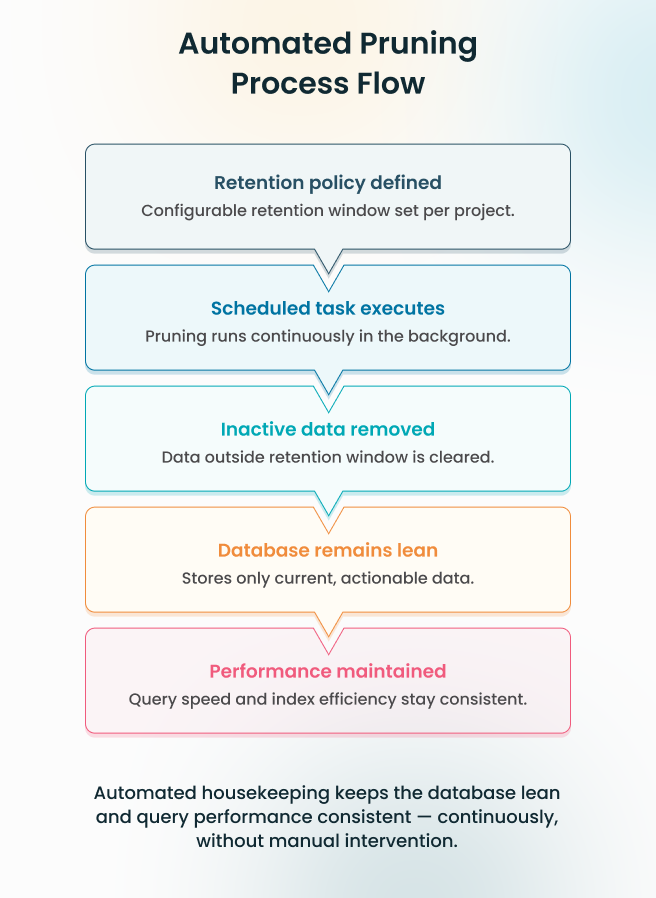
Retention Driven Data Lifecycle
Data storage is governed by a defined retention policy that is fully configurable per project. A high-traffic lead generation site can run a shorter retention window to keep the dataset focused on recent, actionable behavior. An environment where historical pattern recognition drives segmentation can hold data longer. The boundary is set once, and the system enforces it from that point forward, automatically.
Automated Pruning Execution
A background process runs continuously, evaluating stored data against the retention policy and removing what no longer qualifies — without a manual trigger, without admin intervention, and without any impact on the request cycle. Incremental removal keeps table size stable, query plans predictable, and index performance consistent — at all times, without exception.
Sustained Performance by Design
Query performance at one month post-launch holds at twelve. Not because of periodic optimization or manual cleanup, but because data volume is controlled continuously from the start. The indexes stay efficient, query plans remain stable, and response times do not drift as the system matures.
Every layer built on top — reporting, segmentation, behavioral analysis — operates against a dataset that is current, lean, and within defined boundaries. The system does not accumulate overhead over time. It simply keeps working, exactly as it did on day one.
A database that manages itself is one that never becomes a liability. Storage stays lean, performance stays consistent, and the team stays focused on what matters. But a lean database is only one part of the equation. When AI processing enters the picture — external API calls, variable response times, lead scoring at scale — the architecture needs a different kind of answer entirely.
Background AI Processing: No Admin Lag
Every admin action feels instant — and with the right setup, it stays that way.
Most tasks in a WordPress admin panel are straightforward. A click triggers an action, the action completes, and the workflow moves on. When AI is involved, there is more happening behind the scenes — data preparation, an external service being contacted, a response coming back. That is a lot to handle in a single moment.
AI Content Personalizer for WP handles all of it in the background. The heavy lifting happens quietly, out of sight — so every action in the admin panel completes instantly, and the workflow never skips a beat.
Queue Based Task Execution
The moment a lead requires evaluation, the system moves on two fronts simultaneously:
- The task is offloaded to a background queue, removed from the request cycle immediately
- The admin interface completes the action instantly — without waiting, without holding the thread, without introducing any delay
The queue absorbs the processing demand so the interface never has to. That boundary holds regardless of how many evaluations are running in parallel, and regardless of how variable the external API response times happen to be.
Structured Processing Pipeline
Once queued, each task moves through a defined processing pipeline before it ever reaches the external API. Data is normalized and structured at this stage, ensuring every API call dispatched is clean and consistent — regardless of how the lead data was originally captured.
This serves two purposes. It prevents inconsistent inputs from producing unreliable scores. And it means external API response times, however unpredictable, never surface as latency anywhere within the system. The pipeline runs entirely in the background, isolated from every user-facing workflow.
Admin Experience at Scale
From the admin’s perspective, the system behaves as though no heavy processing is taking place at all. Actions complete the moment they are triggered. Navigation stays fluid. No loading states appear — because the background layer is entirely invisible to the interface above it.
As tasks are completed, lead scores and insights are written back to the dashboard automatically. Results simply appear. The processing behind them remains out of sight, exactly where it belongs. A spike in lead volume does not change this — the queue absorbs the increase and delivers results at the same consistent rate, because AI processing scales independently of the interface by design.
An admin interface that never waits — regardless of AI workload, lead volume, or external API variability — is the direct result of one decision made at the architecture level: AI processing was never allowed into the request cycle in the first place. Every layer examined so far has been built on that same discipline. The final layer is where it all comes together — how the data produced by these systems is structured, indexed, and retrieved at the database level.
Dedicated Schema: Optimized for Scale
As websites grow, they do not just serve more pages — they also collect more data. Every visit, interaction, and event adds to the system. Over time, this data becomes large and needs to be handled efficiently.
At this point, how the data is stored becomes just as important as how it is processed. Many WordPress setups rely on general-purpose storage like post meta. This works at a small scale, but as data increases, it becomes slower and harder to manage.
A scalable system solves this by using a dedicated structure built specifically for tracking and querying user activity.
Storage Designed for the Workload
WordPress’s default post meta table was built for flexibility — a general-purpose structure that works across any content type. That flexibility is valuable in many contexts. For high-frequency writes and targeted retrieval across millions of behavioral records, it is the wrong tool entirely.
The dedicated schema stores activity data in a structure built around how that data is actually used. The difference between the two approaches is not marginal. It is structural — and the numbers tell that story more clearly than any explanation could.
| Feature | Post Meta (Generic KV) | Dedicated Schema (Activity Data) |
| Storage Design | Generic key-value pairs | Purpose-built for activity data |
| Query Pattern | Often requires full table scans | B-Tree indexed retrieval |
| Performance at Scale | Degrades as volume increases | Consistent regardless of volume |
| Joins Required | Complex and increasing | None (Flattened/Denormalized) |
| Maintenance | Reactive cleanup needed | Automated, continuous |
Post meta was never designed for this workload. The dedicated schema exists for one purpose, structured for one job—and that specificity is what makes the performance difference measurable rather than theoretical.
Built to Scale Without the Scan
The dedicated schema is indexed on the two fields that define every meaningful query against activity data — visitor identity and timestamp. Indexing on these fields means the database never needs to scan the full table to find records. It follows a direct, ordered path through the index to the exact rows that match the query.
Retrieving activity records for a specific visitor at one million rows takes the same execution path as it does at ten million—because the index structure scales with the data without requiring the query to do more work. Full table scans are eliminated by design, not by optimization applied after the fact.
Performance That Does Not Drift
The result is a database layer where retrieval performance is determined by index efficiency, not data volume. Segmentation queries, behavioral lookups, and AI-driven analysis all operate against a dataset that returns results at consistent speed — whether the table holds one hundred thousand records or one hundred million.
Every layer built on top of this schema — tracking, personalization logic, lead scoring — inherits that stability. The foundation does not become a bottleneck as the system scales. It was built so that scale is not a variable in query performance at all.
A schema built for one job, indexed for one purpose, and designed to grow without any manual effort is not an afterthought — it is what holds everything else in place. Tracking, caching, AI processing, and storage all stay fast and reliable because the foundation underneath them was built to do exactly this, nothing more and nothing less. That foundation is what makes the whole system work — and it becomes clearest when all five layers are seen together.
Conclusion
Every section of this article has pointed to the same thing. A system built not around what looks good on a feature list — but around what actually keeps a site fast while personalization runs quietly in the background. Most tools slow things down over time. Not because something goes wrong, but because they were never built to handle growth. The more data they collect, the heavier they get. And the site that felt fast at launch starts feeling different a few months later.
This is built differently. Every part — how visits are tracked, how pages are cached, how AI scoring works, how data is stored — runs on its own, without getting in the way of anything else. That is what keeps the site fast. Not just at launch, but consistently, as it grows. With ZealousWeb, this is how we build. Fast sites and smart personalization are not a trade-off. When the foundation is right, you get both — without choosing one over the other.
The result is something teams can rely on. A system that works on day one, holds up as traffic grows, and never asks you to go back and fix something that should have been right from the start.
What has been built here is not a feature. It is a foundation.
Curious How Personalization Scales Without Slowing Your Site?
Book a Technical Walkthrough with Us
FAQs
How can I control development costs without sacrificing quality?
ZealousWeb optimizes workflows with a high-performing stack, ensuring faster delivery and fewer iterations, reducing overall project cost while maintaining top-quality results.
Can ZealousWeb meet tight project deadlines?
Yes. Our structured processes, skilled developers, and scalable resources allow us to meet deadlines reliably without compromising performance or personalization quality.
How do you ensure the security of my WordPress projects?
ZealousWeb implements security best practices at every layer, including database isolation, secure API handling, and automated housekeeping to prevent vulnerabilities and maintain compliance.
How experienced is ZealousWeb in handling complex WordPress workflows?
Our team has extensive experience with high-scale WordPress architectures, decoupled personalization, and AI-driven workflows, ensuring expertise from planning through deployment.
Will I get ongoing support if issues arise post-launch?
Absolutely. ZealousWeb provides proactive monitoring, maintenance, and optimization support to ensure sustained performance and minimal downtime after launch.


