


Forms are the backbone of every WordPress project powering onboarding, registrations, and payments with seamless data flow. In today’s fast-paced world, teams and clients value instant, polished, and secure documents that keep processes smooth and professional. Well-designed forms do more than collect information they can enhance client experience, improve accuracy, and make every interaction feel effortless.
PDF automation makes this effortless. Submissions are instantly transformed into branded, ready-to-send documents, streamlining communication and boosting efficiency. Teams can focus on high-value work instead of repetitive tasks, while clients enjoy faster responses and consistent, professional deliverables. With smarter workflows, WordPress forms become more than just a tool they become a reliable, scalable engine for success, helping agencies grow and deliver with confidence.
What Is “Generate PDF Using Contact Form 7 Pro”?
Generate PDF Using Contact Form 7 Pro is a WordPress plugin that converts Contact Form 7 submissions into professional PDFs automatically.
It adds features missing from the core plugin, including:
- Instant PDF generation after submission
- Customizable templates for branding
- Secure document handling
- Basic workflow automation
Freelancers can streamline document creation without coding. Agencies can standardize PDFs across multiple clients, making automation a high-value addition to WordPress projects.
Common Problems with Default Contact Form 7 (And Why You Need More)
Contact Form 7 is reliable for forms, but it has limitations. It collects data well but doesn’t create PDFs, manage workflows, or secure documents automatically. Teams end up manually exporting and formatting submissions slowing projects and limiting scalability for freelancers and agencies.
- No PDF generation: Submissions remain raw data.
- Manual processes: Exporting and formatting PDFs is slow and error-prone.
- Limited branding control: Standard forms don’t produce client-ready documents.
- No security features: Password protection or restricted access isn’t included.
- Workflow gaps: Automating document delivery or storage requires custom solutions.
For professionals handling high-volume or client-facing workflows, these gaps can cost time, quality, and revenue.
Key Features That Make This Plugin Agency-Ready
Unlike basic WordPress PDF plugins, this solution is designed for automation at scale. Its features focus on eliminating manual effort while supporting high-volume, document-driven workflows across multiple WordPress projects making it well-suited for freelancers and agencies.
Automatic PDF Generation After Form Submission
Once a user submits a form, the system instantly generates a clean, structured, and branded PDF no manual steps required. Whether its invoices, quotations, job applications, certificates, or event tickets, the data is formatted automatically into a ready-to-use document. This eliminates repetitive admin work, reduces errors, and ensures consistent document formatting across all submissions.
Send PDF via Email to Users and Admin
Generated PDFs can be automatically attached to emails sent to users, administrators, or internal teams. This ensures immediate confirmation, faster approvals, and smoother internal workflows. For example, customers receive receipts instantly, HR teams get applications in real time, and managers can review documents without logging into the dashboard.
Fully Customizable PDF Templates
Design PDFs exactly the way your business needs. Customize layouts, fonts, headers, footers, logos, background images, and watermarks to match your brand identity. Advanced support such as RTL layouts and multilingual content makes this ideal for international businesses, government portals, and global organizations that need localized documents.
Cloud Storage Integration
Automatically store generated PDFs in cloud platforms like Google Drive or Dropbox for easy access and collaboration. Files are organized systematically, making it simple for teams to retrieve, share, or audit documents without relying on local storage or manual uploads.
Advanced Security Features
Protect sensitive information with password-protected PDFs, controlled access, and secure sharing options. These security measures are especially valuable for handling contracts, financial records, memberships, and confidential applications, ensuring compliance and safeguarding user data from unauthorized access.
These features make PDF generation scalable, secure, and fully integrated into WordPress workflows. By automating formatting, delivery, and storage, teams can focus on clients and growth, while ensuring documents are accurate, professional, and brand-consistent.
High-volume submissions are handled effortlessly, approvals and communications are faster, and errors are minimized. Customizable templates and cloud integration make collaboration seamless, even across multiple projects. Overall, it transforms PDF management from a repetitive task into a smooth, reliable workflow.
Real-World Use Cases for Freelancers & Agencies
Automated PDF generation supports some of the most common, revenue-driving workflows handled by freelancers and digital agencies. By converting form submissions into structured, branded PDFs, teams can reduce manual work, improve accuracy, and deliver faster results across client projects.
Client Proposal Generation
Inquiry or lead capture forms can automatically generate professional, client-ready proposal PDFs as soon as a form is submitted. All submitted details client information, requirements, pricing, and timelines are structured into a consistent proposal format. This enables faster follow-ups, eliminates manual document creation, and ensures every proposal reflects your brand and formatting standards.
Invoice & Quotation Automation
Invoices and quotations are generated instantly using form data, removing the need for manual calculations and document formatting. This automation helps businesses reduce administrative overhead, avoid errors, and maintain consistent branding across all financial documents ideal for agencies, service providers, and growing teams handling frequent transactions.
Event Registration Confirmations
Event registration forms can automatically create confirmation PDFs, tickets, or passes immediately after submission. Attendees receive structured, downloadable documents with event details, QR codes, or instructions, improving communication while reducing manual coordination for organizers.
Job Application Submissions
Job application forms can generate structured applicant PDFs containing resumes, cover letters, and form responses in a standardized format. This makes it easier for HR teams to review, store, and securely manage applications, while maintaining consistency and compliance across recruitment workflows.
Membership & Contract Documentation
Membership sign-ups and agreement forms can automatically trigger contract PDFs, onboarding documents, or membership records. This ensures consistent record keeping at scale, improves document accuracy, and supports secure handling of legal or subscription-based documentation.
Automated PDF generation turns WordPress forms into efficient, document-driven workflows. By eliminating manual formatting, speeding approvals, and ensuring brand consistency, freelancers and agencies can focus on clients and growth. High-volume submissions are handled effortlessly, while cloud storage and security keep documents organized and compliant, delivering faster, professional results every time. Teams can scale operations without added overhead, reduce errors, and maintain a polished client experience across projects. This makes PDF automation an essential tool for any professional WordPress workflow.
Step-by-Step Setup Guide (With Screenshots)
This section walks through the core setup process to help you get PDF automation running quickly without custom development. Each step is designed to align with standard WordPress workflows and Contact Form 7 configurations.
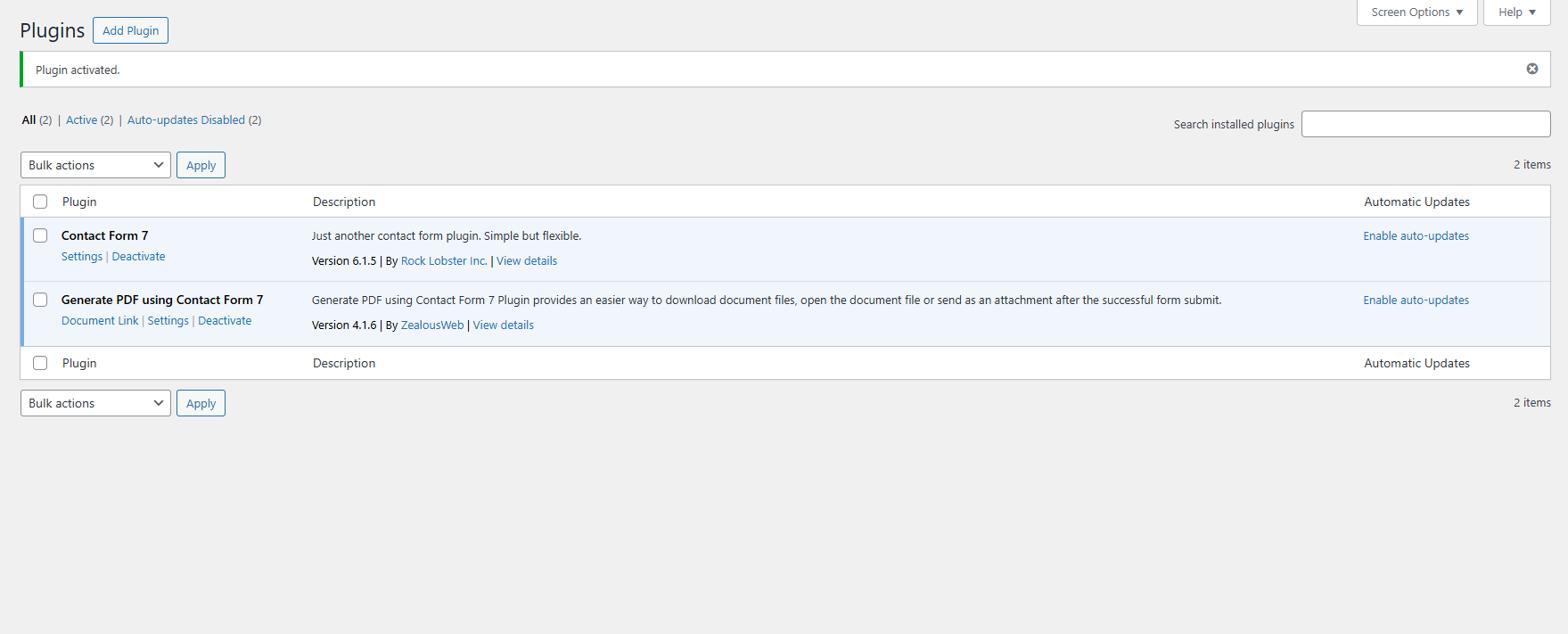
Installing the Plugin
Activate from the WordPress dashboard.
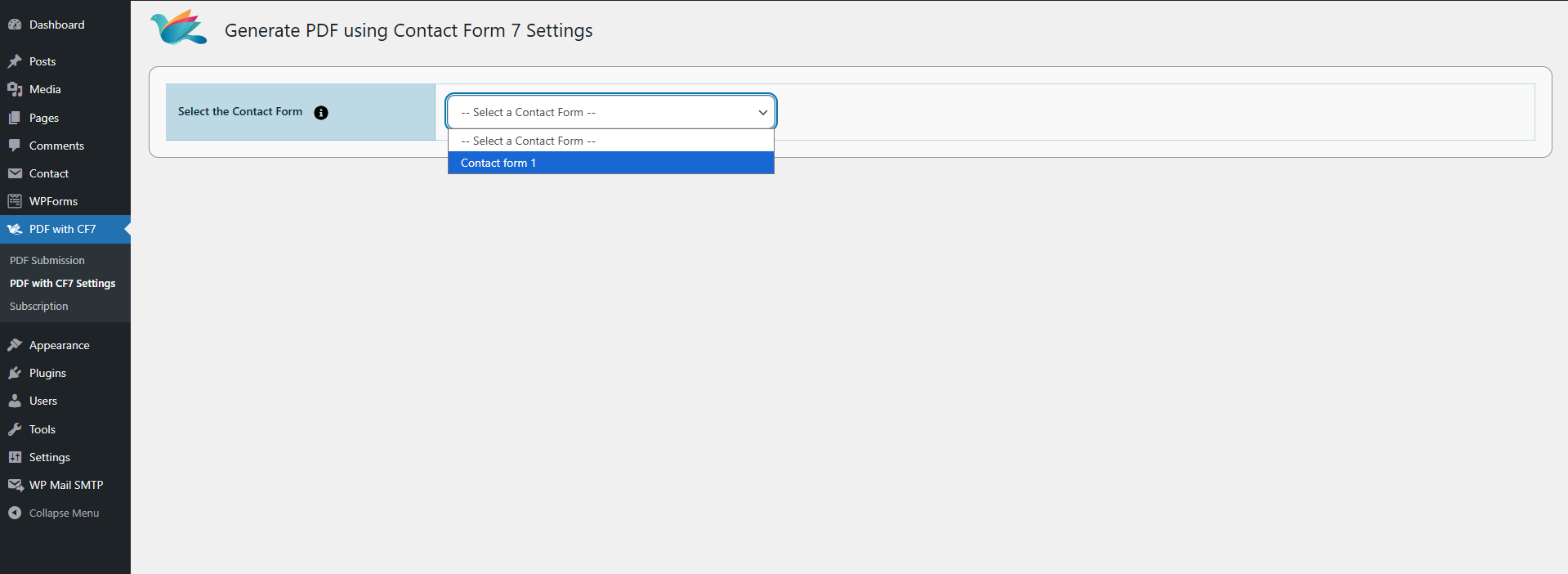
Connecting It with Contact Form 7
Map form fields to PDF fields.
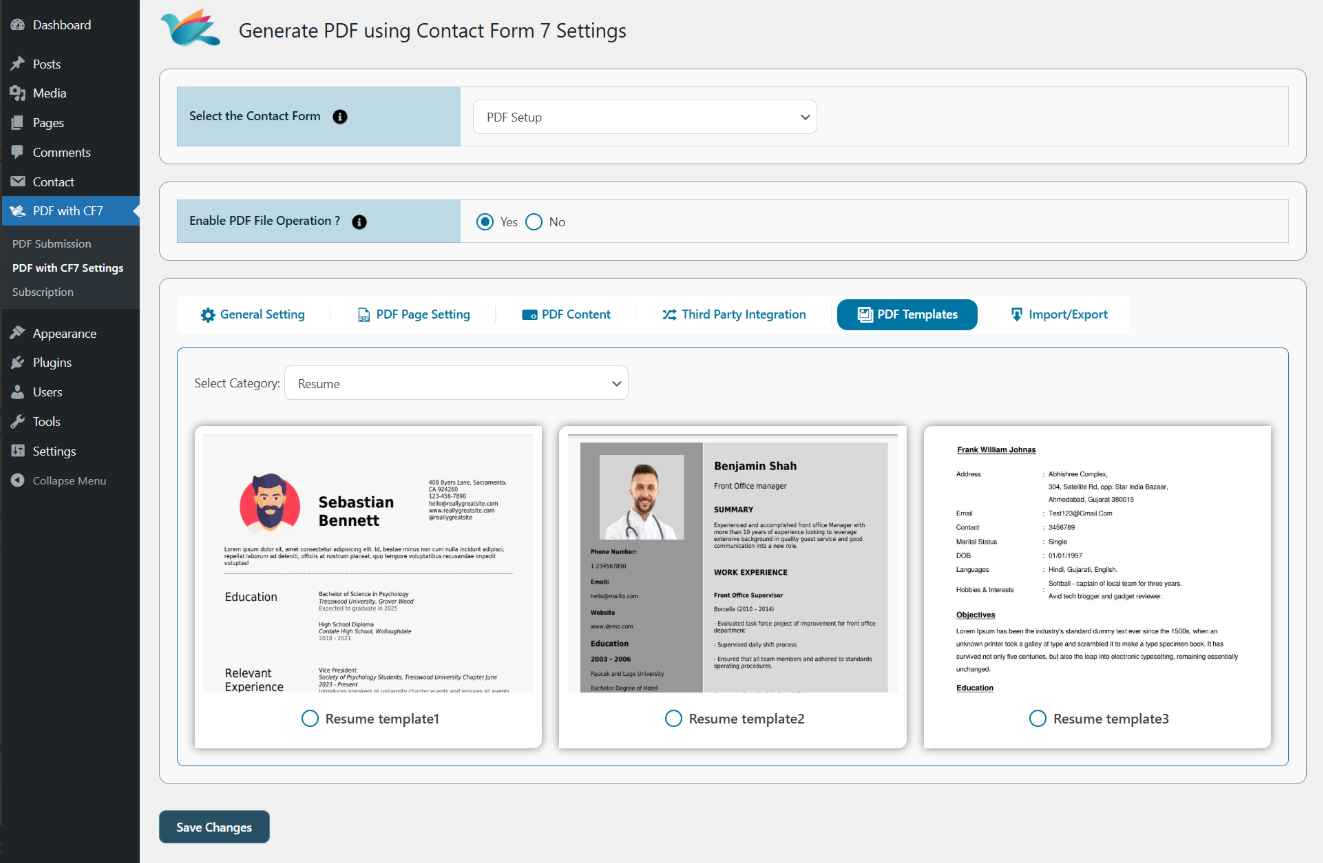
Configuring PDF Layout & Design
Adjust branding, headers, footers, and templates.
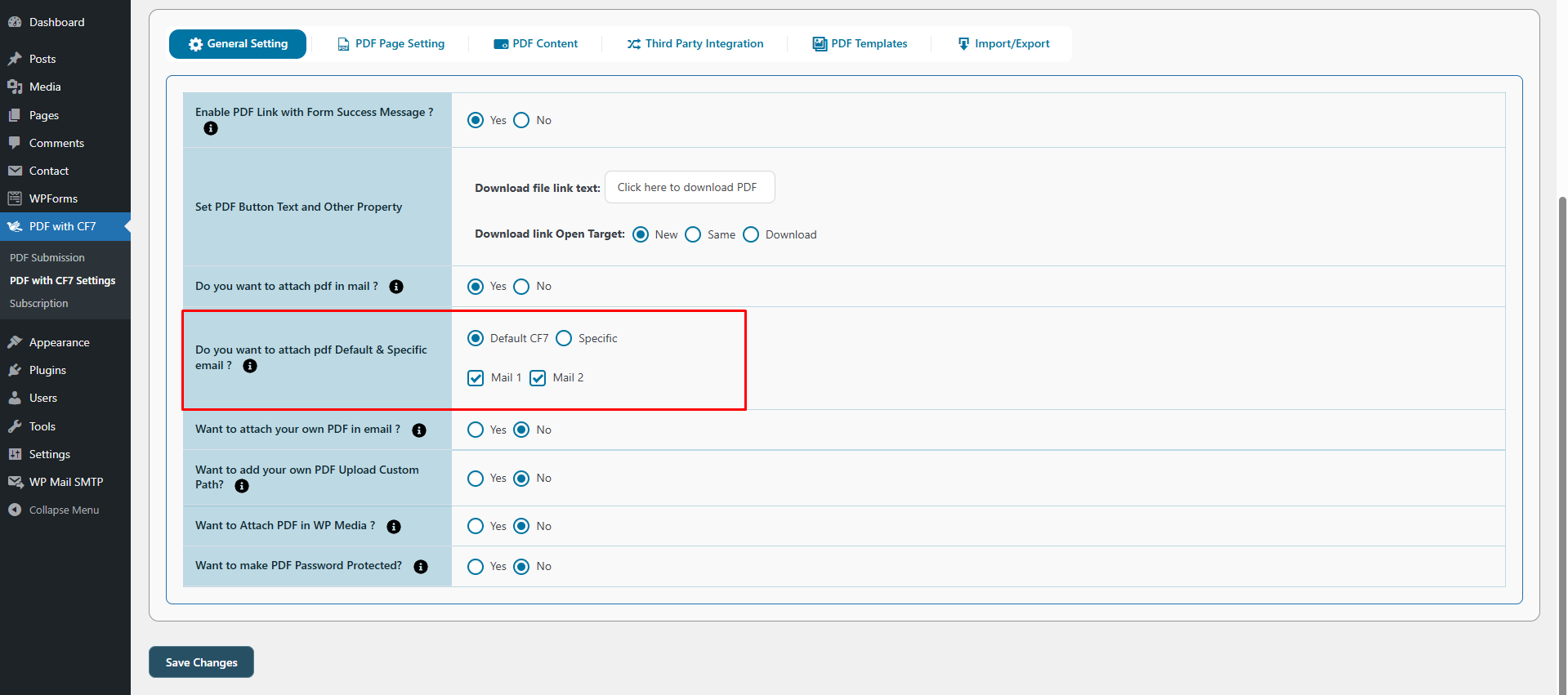
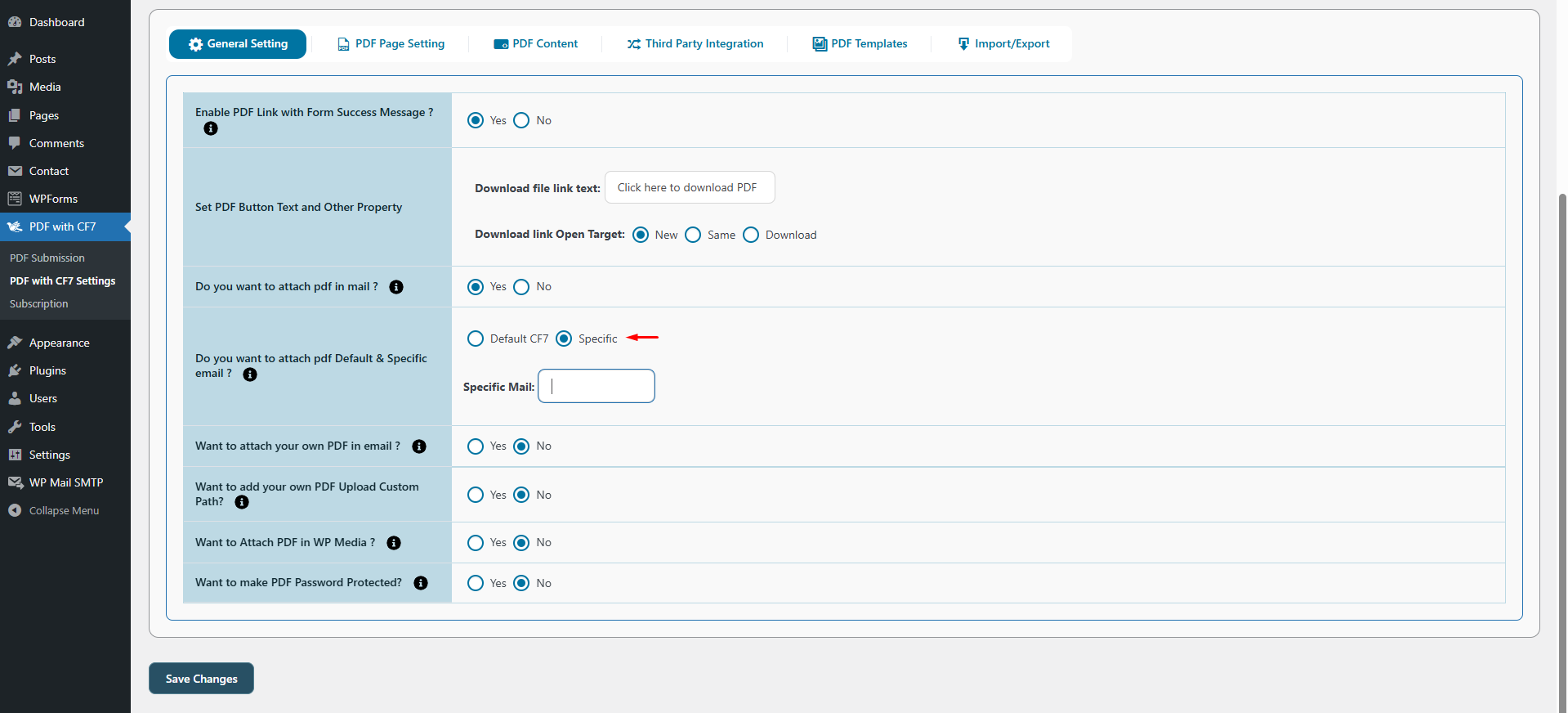
Setting Email Attachments
Automatically send PDFs to recipients.
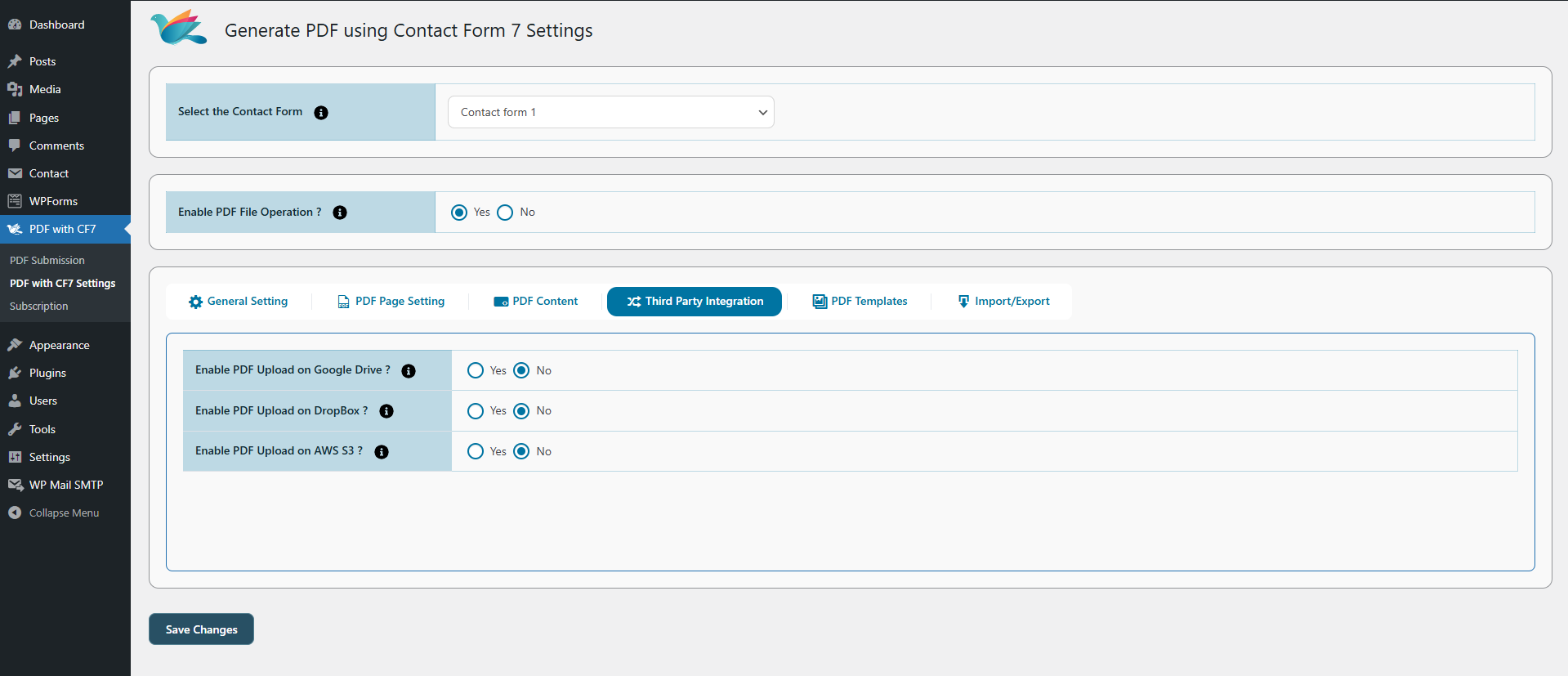
Enabling Cloud Storage
Save PDFs to Google Drive or Dropbox.
Applying Password Protection
Password-protect PDFs and restrict access.
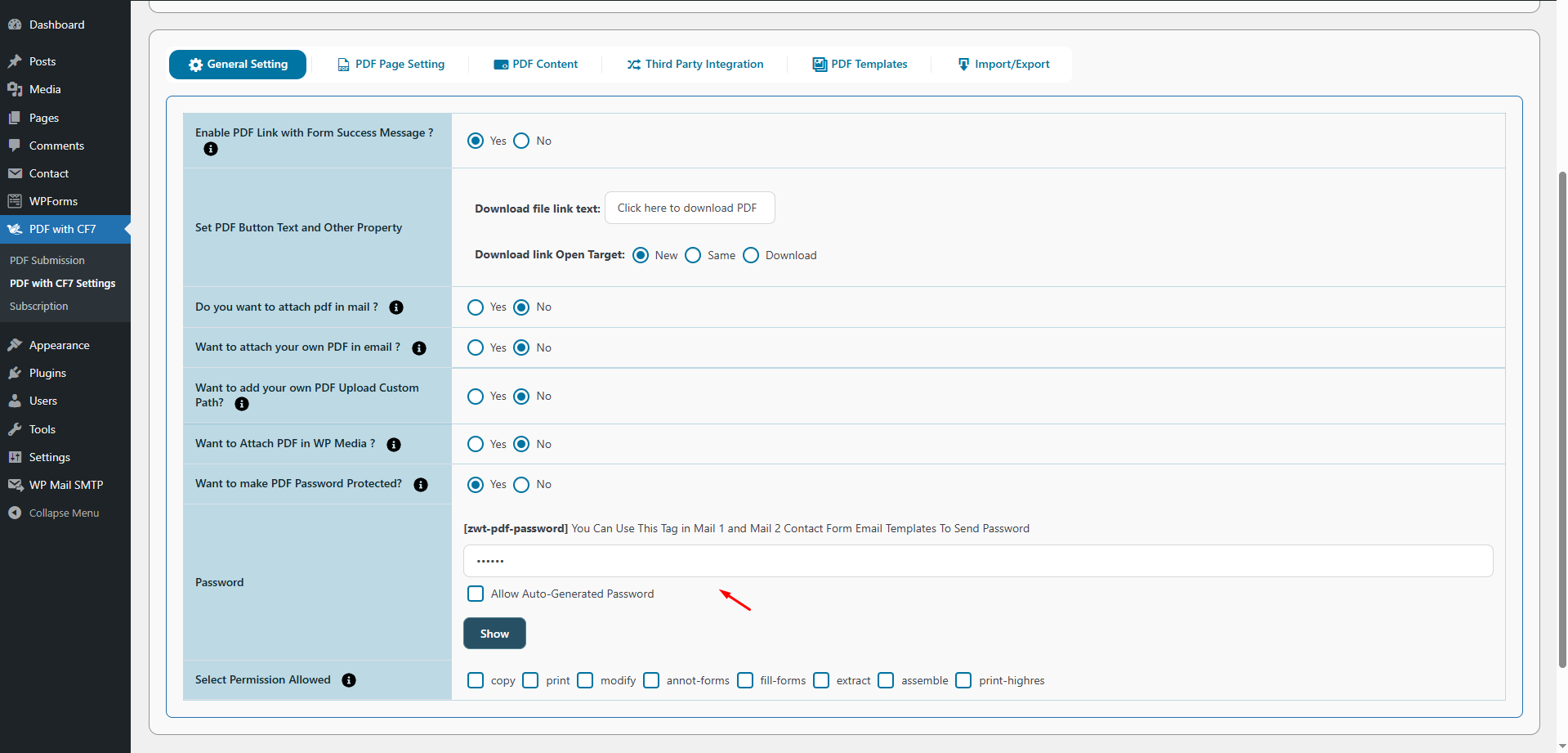
Once configured, every form submission becomes a ready-to-use, secure PDF without extra effort.
How This Plugin Saves Time and Increases Agency Profit Margins
Managing documents manually can be one of the biggest hidden drains on agency and freelancer productivity. Exporting form submissions, formatting files, and handling follow-ups not only take hours but also increase the risk of errors and inconsistent outputs.
This plugin changes the game by automating PDF workflows directly from Contact Form 7. It:
- Eliminates repetitive tasks like formatting and file management
- Reduces errors and ensures consistent outputs
- Frees teams to focus on high-value tasks like strategy and client delivery
- Scales across multiple projects without extra overhead
By removing manual bottlenecks, teams can deliver faster, more reliable results while maintaining brand consistency. The outcome is not just improved efficiency it’s higher client satisfaction, stronger profitability, and a workflow that grows with your business.
SEO & Performance Considerations
Generating PDFs in WordPress introduces additional server load, especially on high-traffic sites, so performance must be managed carefully. Following best practices such as creating files only when needed, optimizing templates, and minimizing heavy assets keeps execution fast without impacting page speed
or form submissions.
To support scalability, teams should leverage caching, background processing, and cloud-based storage. Properly implemented, PDF automation maintains site speed, SEO visibility, and a smooth user experience across multiple WordPress projects.
Comparison: Why This Is Better Than Basic PDF Plugins
Not all PDF plugins are designed for automation-driven WordPress workflows. While basic tools may support simple PDF exports, they often fall short when agencies need scalability, security, and flexible automation. The comparison below highlights why this solution is purpose-built for real-world, high-volume agency use cases rather than one-off document generation.
| Feature | Basic PDF Plugins | Generate PDF Using CF7 Pro |
| Customization | Limited | Advanced |
| Automation | Minimal | End-to-end |
| Security | Basic | Enterprise-ready |
| Cloud Storage | Rare | Built-in |
| Agency Focus | No | Yes |
For agencies and freelancers managing multiple projects, full automation, security, and customization make a measurable difference in efficiency and client satisfaction.
Pricing, Licensing & ROI for Agencies
Agencies evaluate WordPress PDF plugins not just by cost but by time saved and workflow efficiency. Automating document creation eliminates hours of repetitive tasks, allowing licensing costs to be recovered quickly.
Multi-site support ensures the same setup can be reused across multiple WordPress projects, ideal for recurring Contact Form 7–based workflows. Over time, PDF automation reduces maintenance, ensures consistent outputs, and creates reusable systems that grow with the agency, making it a long-term investment rather than a one-off tool.
Why Agencies Should Offer PDF Automation as a Premium Service
Client expectations now go beyond basic WordPress functionality. Offering PDF automation as a premium service allows agencies to enhance standard form workflows while improving efficiency, scalability, and business outcomes.
Upsell Opportunities
High-value features such as branded PDFs, automated invoices, secure reports, and cloud storage can be offered as add-ons or bundled into premium packages, increasing project value with minimal extra effort.
Competitive Differentiation
Advanced PDF automation positions agencies as workflow partners rather than just site developers. Streamlining client operations and reducing repetitive tasks helps agencies stand out and deliver measurable business impact.
Retainer & Maintenance Advantages
Automated workflows require ongoing updates, security checks, and template optimization, creating opportunities for retainers and long-term support agreements while maintaining reliable systems.
By offering PDF automation, agencies can provide more than just functional WordPress sites they deliver streamlined, high-value workflows that save clients time, reduce errors, and enhance operational efficiency. This approach strengthens client relationships by demonstrating a clear impact on business outcomes, while also opening new revenue streams through premium features, retainers, and long-term support agreements. Ultimately, PDF automation allows agencies to differentiate themselves in a competitive market, scale their services, and consistently deliver measurable value, turning routine form management into a strategic advantage for both the agency and its clients.
Conclusion
Automation works best when it empowers your team. Generate PDF Using Contact Form 7 Pro handles repetitive tasks like PDF creation, formatting, and delivery, so you can focus on strategy, client communication, and project growth.
Your WordPress projects run faster, outputs stay professional, and your clients get polished, branded PDFs every time. For expert support implementing PDF automation in WordPress, partner with ZealousWeb. Our team helps agencies and freelancers integrate these solutions efficiently, ensuring projects scale seamlessly without adding complexity.
Exploring the right set of purpose-built WordPress plugins is the next step toward building that system one that fits your workflows today and supports growth tomorrow.
Explore Workflow-Focused WordPress Plugins
Find Plugins That Scale.
FAQs
Does it work with all CF7 fields?
Yes. The plugin supports all standard Contact Form 7 fields, including text, email, checkboxes, radio buttons, and file uploads, ensuring every submission can be converted into a PDF.
Can PDFs be customized per form?
Absolutely. Each form can have its own custom PDF template, allowing different layouts, branding, headers/footers, and watermarks for client-specific or project-specific documents.
Is it compatible with multilingual websites?
Yes. The plugin supports RTL languages and multilingual WordPress setups, making it suitable for global projects and agencies serving diverse audiences.
How secure are generated PDFs?
Generated PDFs can be password-protected and stored with restricted access. Cloud integrations with Google Drive or Dropbox further enhance secure storage and sharing.
Does it support large-scale form submissions?
Yes. The plugin is designed for high-volume workflows, enabling automated PDF generation even for websites with frequent form submissions without compromising performance.