


ZealousWeb
baby ecommerce mobile app features

Must-Have Features of a Successful Baby eCommerce Mobile App

December 29, 2025Posted By: Manjiri Bhate
Baby eCommerce AppseCommerce App DevelopmentMobile App FeaturesMobile Commerce Strategy

Did you know there are about 8.93 million apps available worldwide on the App Store and Google Play? That’s a huge number, and every app brings something unique to the table. If you’re running a baby ecommerce business, you probably know many similar businesses are competing out there in these app stores.

But your business is special. Your app has the potential to stand out and be on every parent’s phone. To make that happen, your app needs some standout features that not only work flawlessly but also make users enjoy using it. In this blog, we’ll walk you through all the must-have features for a successful baby ecommerce app. So stick around till the end because we’re also giving you a handy checklist to make sure you don’t miss a thing when launching your app.

The Complete Feature List for Baby eCommerce Apps

Your app’s success depends largely on how smoothly it serves parents’ needs and enhances their shopping experience. Investing in these essential features means creating an app that is reliable and enjoyable.

Seamless Onboarding

Everyone knows that getting your app noticed on the App Store or Google Play is just the first step. But even more important is convincing people to actually download your app and keep it on their phones. Onboarding is the first experience a new user has when they open your app. It’s your chance to make a great impression, show users how your app works, and help them get started easily. Good onboarding makes users feel confident and excited to keep using the app.

Here are the key elements to include:

  • A warm greeting or intro screens highlighting your app’s benefits.
  • Guide users through creating profiles or setting preferences.
  • Use interactive tours, tooltips, or quick tutorials for key features.
  • Show users early how your app solves their problems.
  • Clear calls to action directing next steps.
  • Reveal new features gradually to avoid overwhelming users.
  • Offer feedback options to improve the onboarding process.

Remember, start soft with a friendly welcome, not a login wall. Ask only for essentials upfront—baby’s birth date, age range, preferences.

Wise Word:

Use gentle animations or pastel progress bars to show how far users are in setup, reducing effort and keeping motivation high.

Quick and Intuitive Account Setup

Getting users signed up should never feel like a chore. It’s one thing to get someone interested in your app, but if the account setup is slow or complicated, they might just give up. A quick and intuitive signup process makes it easy for new users to start experiencing your app’s benefits without any frustration.

Here’s how to keep it quick and user-friendly:

  • Ask only for essential information, like email or the baby’s details, to keep the signup short.
  • Allow signups via Google, Facebook, Apple, or other platforms for faster access.
  • Use friendly error messages and hints to help users fill forms correctly.
  • Reduce typing by suggesting or auto-filling common details.
  • Ensure buttons and fields are easy to tap and navigate on small screens.
  • Enforce strong passwords, but keep the process straightforward. Consider biometric login options.
  • Show users how far they are if signup has multiple steps, avoiding overwhelm.

Wise Word:

Auto-fill features and clear, friendly error messages go a long way in making account setup smooth and user-friendly.

Offering Smart Personalization

Nowadays, everyone talks about the power of personalization. Around 80% of consumers say they’re more likely to buy from brands that offer personalized shopping experiences. When it comes to baby ecommerce apps, parents want experiences that feel made just for them and their little ones. Offering smart personalization means delivering relevant content, suggestions, and offers that match each user’s unique needs.

Key personalization elements to include:

  • Suggest products based on the baby’s age, past purchases, and preferences.
  • Change banners, messages, and offers to fit the user’s current needs or season.
  • Adjust app flow based on whether a user is a new parent or an experienced shopper.
  • Use browsing behavior to display timely tips, deals, or reminders.
  • Send messages that matter to individual users, avoiding generic spam.
  • Be transparent and respectful with user data to build trust.

Wise Word:

Recommendation engines learn from each parent’s behavior and preferences. They deliver the right products and content just when parents need them.

Provide Frictionless Search and Advanced Filtering

When parents are shopping for baby products, ease and speed are everything. If they can’t find what they want quickly, they’ll lose interest fast. That’s why frictionless search and smart filtering are must-have features for any baby ecommerce app.

Here’s how you can make search and filtering a breeze:

  • Offer instant suggestions, autocorrect, and the ability to understand common misspellings or synonyms.
  • Let users filter products by age, size, brand, price, safety features, and more to narrow down choices.
  • Support ‘and/or’ filtering so users can mix multiple options (like organic + stroller + under $100) for precise results.
  • Show only relevant filters based on the category or search context.
  • Allow users to quickly preview product details, images, or ratings without leaving the search page.
  • Ensure filters and search work flawlessly on smaller screens with easy taps and clear layouts.

Wise Word:

When you use smart filters, you only show what truly matters to each parent. The buying process becomes simple and direct.

Focusing on UI/UX Elements

Baby ecommerce apps should be pretty as well as craft an experience that feels natural, calming, and effortless. Every tap, swipe, and scroll should be intuitive, helping parents find exactly what they need with as little friction as possible. When an app feels easy and pleasant to use, parents are more likely to come back—and recommend it to others.

Key design elements to focus on:

  • Use clear menus and familiar icons so parents can easily move through the app.
  • Soft, gentle colors combined with easy-to-read fonts make browsing comfortable.
  • Ensure buttons and links are big enough and spaced well for little fingers or quick taps.
  • Keep the app’s look and feel uniform across all screens to avoid confusion.
  • Optimize images and code so users aren’t stuck waiting—because every second counts when caring for a baby.
  • Small animations, like button highlights or loading spinners, provide reassuring feedback without distracting.

Wise Word:

Partner with ZealousWeb to build not just a visually appealing baby ecommerce app, but one that truly understands your users.

Offer Subscription and Reorder Workflows

A subscription service lets parents receive essential baby items—like diapers, wipes, or baby food—delivered regularly without having to place repeated orders. This model benefits both families looking for reliability and businesses securing long-term customer loyalty through steady, predictable orders.

Here’s how to make subscriptions and reorders work seamlessly:

  • Let users choose delivery frequency, pause, or change their subscriptions easily.
  • Allow parents to reorder past purchases instantly with a single tap.
  • Send gentle notifications when it’s time to reorder based on past buying patterns.
  • Clearly show savings on subscriptions to encourage sign-ups.
  • Make it simple to modify or cancel subscriptions to build trust and reduce churn.
  • Support saved cards, wallets, and other payment methods for smooth recurring billing.

Wise Word:

Offering flexible subscription models can help you adapt to every parent’s unique needs and preferences.

Offer Real-Time Support and Caring Chat Features

Parents shopping for baby products need real-time support that is quick, reliable, and available. This is why offering instant chat support is essential for baby ecommerce apps today.

AI-powered chatbots can provide 24/7 assistance that instantly answers common queries, guides users through product choices, and even helps with order tracking. These chatbots can quickly escalate issues, ensuring parents aren’t left waiting and stressed.

Key features to include:

  • Provide 24/7 instant answers to common questions, product guidance, and order tracking.
  • When needed, this real-time support can quickly connect users to real agents without hassle.
  • Ensure support messages feel warm, empathetic, and understanding of parents’ unique concerns.
  • Offer chat support across the app, website, and social platforms for consistent service.
  • Use smart FAQs and knowledge bases integrated with chat for fast problem-solving.
  • Trigger chat pop-ups based on browsing behavior, helping before parents even ask.

Wise Word:

Consider placing an AI chatbot in the bottom corner of your website or app. This friendly assistant can help parents shop smoothly, answer recurring questions, and offer support anytime.

Leverage Reviews and Social Proof Effectively

Reviews in today’s ecommerce world tell your story and build real trust with potential customers. In fact, studies show that 98% of shoppers read reviews before making a purchase, and seeing positive feedback can boost your conversion rates by up to 70%. Reviews make customers feel confident about their choices, especially when it comes to products for their babies.

Here’s how to use reviews and social proof effectively:

  • Showcase authentic customer reviews prominently on product pages and throughout your app.
  • Encourage photo and video reviews as they add credibility and help parents see real-life product use.
  • Respond to reviews promptly, especially negative ones, to show you care and resolve issues.
  • Highlight star ratings and review summaries to give quick insights at a glance.
  • Leverage user testimonials on landing pages to build trust before users browse products.
  • Use social proof pop-ups to show recent purchases or reviews, creating a sense of urgency and popularity.
  • Integrate reviews into marketing campaigns to reach new customers with authentic voices.

Wise Word:

Investing in online reputation management (ORM) services not only protects your brand but also strengthens your profile and attracts more trusting customers.

Invest in Personalization and Permission Management

Personalization extends to how you communicate with your users. Thoughtful permission management ensures parents only receive the notifications, and their data is used only with their permission, making your app feel respectful and user-friendly rather than intrusive. Push notifications are powerful tools for engagement, but must be handled wisely.

Key best practices include:

  • Ask for permissions at the right moment (ideally after users see the value your app provides).
  • Segment your audience based on behavior, preferences, and purchase history to send highly relevant messages.
  • Personalize notifications with the user’s name, baby’s age, or recent activity to make messages more meaningful.
  • Avoid sending too many notifications or messages at inconvenient times.
  • Offer easy opt-in and opt-out options to respect users’ control over their communication preferences.
  • Use push notifications for helpful reminders, such as subscription renewals, sales on favorites, or new arrivals matching preferences.
  • Monitor open rates and feedback to continuously improve your messaging strategy.

Wise Word:

Personalization is only as good as how well you respect your users’ choices. Smart permission management paired with tailored messaging builds trust, keeps parents engaged.

Invest in Analytics and Insights Dashboard

Understanding how your app performs is crucial to growing and improving. An analytics and insights dashboard provides real-time data about user activities, popular features, and overall engagement. This helps you make informed decisions to enhance the app experience, boost retention, and increase revenue.

Here’s what a good dashboard can do for your baby app:

  • Track how parents interact with different features to identify what they value most.
  • Measure engagement to see active users, session duration, and frequency of logins.
  • Analyze growth trends to spot patterns in downloads, user retention, and subscription renewals.
  • Identify bottlenecks to optimize onboarding flows or feature accessibility.
  • Use data to create tailored experiences, recommendations, and offers that resonate with individual users’ needs.
  • Measure the success of marketing efforts, subscription models, and in-app purchases to maximize profits.

Wise Word:

Hire expert data analysts to unlock the full potential of your app’s data. Partner with ZealousWeb for top-tier analytics expertise that turns insights into smart growth strategies.

Be Committed to Accessibility, Inclusivity, and Transparency

Building trust means creating baby ecommerce apps that everyone can use, regardless of ability or background. Accessibility, inclusivity, and transparency are essential commitments to make your app welcoming to all parents. Following standards like WCAG helps you avoid barriers for users with disabilities, while clear communication and honest practices build confidence and loyalty.

Key elements to focus on:

  • Use readable fonts, sufficient color contrast, and alt text for images so everyone can access your content.
  • Ensure browsing works with keyboards and assistive devices, with touch targets large enough for all users.
  • Keep language simple, provide clear instructions, and avoid confusing layouts.
  • Support various devices, browsers, and assistive technologies reliably.
  • Consider cognitive disabilities, multilingual options, and adjustable text sizes to serve diverse users.
  • Clearly share your privacy, data use, and security commitments with users.
  • Regularly check and update accessibility through automated tools and real user feedback.

Wise Word:

Research shows that accessible mobile app solutions can increase customer retention by up to 36%, as well as help you avoid penalties.

Explore Gamified Learning and Engaging Content Features

Parents and babies both benefit from learning that feels fun and interactive. Gamification turns everyday app interactions into engaging experiences, encouraging parents to stay active and involved while helping their little ones learn and grow. This approach boosts retention, builds stronger connections, and makes your app a daily go-to resource.

Key ways to implement gamified and engaging content:

  • Celebrate baby’s developmental milestones with badges, points to motivate parents.
  • Offer simple, age-appropriate games that encourage learning through play for babies and toddlers.
  • Provide bite-sized parenting tips or mini-challenges that keep users coming back for fresh content.
  • Visually showcase the baby’s growth and learning progress to give parents a sense of achievement.
  • Invite parents to share photos, stories, and tips, creating community engagement.
  • Use videos, animations, and interactive tutorials to make learning dynamic and enjoyable.

Wise Word:

Gamification triggers dopamine release during achievements, making users feel rewarded and motivated. This encourages parents to engage longer and complete tasks, turning learning into enjoyable, habit-forming experiences.

Invest in Continuous Optimization and Refinement

Continuous optimization, powered by real user feedback, is the key to evolving with your customers’ changing needs. By regularly refining your app, you keep it fresh, user-friendly, and perfectly aligned with what busy parents expect—turning casual users into loyal advocates.

How to make continuous improvements work for you:

  • Collect feedback through in-app surveys, reviews to understand parent needs and pain points.
  • Use analytics tools to track feature usage, drop-off points, and engagement patterns to spot opportunities.
  • Release improvements, bug fixes, and new features frequently to stay ahead of expectations.
  • Use A/B testing or beta releases to validate changes and minimize risks.
  • Highlight new features and improvements in “What’s New” sections.
  • Send push notifications to keep users informed and excited.
  • Adapt quickly to evolving technologies, trends, and customer preferences to enhance the user experience continuously.

Wise Word:

Don’t get stuck guessing what works. Use A/B testing to continuously learn and optimize your app. These data-backed decisions improve user experience and boost conversions for real results every time.

Now that you know all the essential must-haves and have everything you need at your fingertips, it’s time to make sure nothing slips through the cracks. This quick founder’s checklist helps you strike off each critical step, ensuring your baby ecommerce app is set up for success from day one.

Founder’s Action Checklist for Building Baby eCommerce Apps

Make sure to download this handy checklist and keep it close. That way, whenever you’re planning or reviewing your baby ecommerce app, you’ll have a trusted guide ready to help you strike off each important step and save time, avoid mistakes, and steer your app toward success.
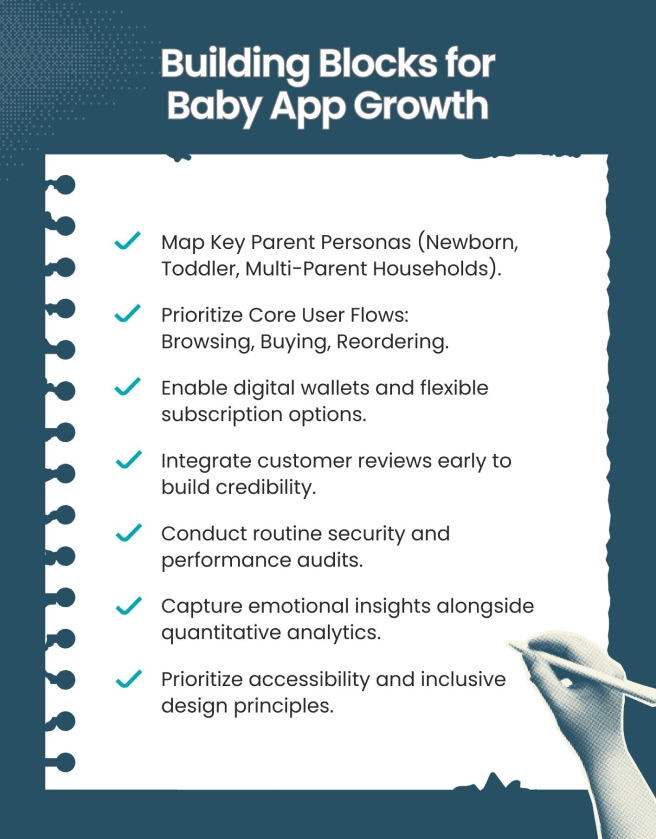
Baby app growth

Conclusion

A truly successful baby eCommerce app anticipates what busy parents need before they do, reducing stress and offering support through every tap and screen. By blending thoughtful design with empathy, your app becomes a trusted companion in their parenting journey.

Check out our exclusive guide packed with expert insights and proven strategies. Still have questions or need personalized advice? Don’t hesitate—give us a call and let’s build something amazing together.

FAQs

How can eco-friendly practices be integrated into baby eCommerce stores?

What are the most effective cross-selling strategies for baby products?

How do subscription models impact customer loyalty in baby product eCommerce?

What role does mobile optimization play in baby eCommerce success?

Table of Contents

Subscribe To Our Newsletter

Related Blog Posts

mobile-first design for baby ecommerce

Why Is Accessibility and Mobile-First Design Crucial for Baby eCommerce Stores?

December 24, 2025
Baby eCommerce UXeCommerce AccessibilityMobile Commerce StrategyMobile-First Design
baby store homepage trust

Why Baby Store Homepages Fail to Build Trust

December 22, 2025
baby eCommerceEcommerce DesigneCommerce UXWebsite Trust
ecommerce checkout optimization

Reducing Cart Abandonment with UI/UX Best Practices

December 18, 2025
Cart AbandonmentEcommerce OptimizationShopify UXUI UX Best Practices
customer complaints UX

What Your Customers’ Complaints Reveal About Your UX and How to Fix It

December 15, 2025
eCommerce UXUsability IssuesUX redesignUX Strategy
poor mobile UX

How Poor Mobile UX Shows It’s Time for a Revamp

December 11, 2025
eCommerce Mobile ExperienceeCommerce UXMobile-First DesignUX Audit
build a profitable baby store

How to Build a Profitable Online Baby Store Without Tech Headaches

December 10, 2025
baby eCommerceeCommerce StrategyShopify Baby Store TipsUI UX for baby stores
baby store UX revamp

Signs Your Baby Store Needs a UI/UX Revamp: The Definitive Guide

December 04, 2025
baby eCommerceeCommerce UXUI/UX auditUX redesign
baby store website design tips

Trust-Building Through Design — How Baby Stores Win Parents’ Confidence

December 02, 2025
baby eCommercedesign psychologyTrust BuildingUI/UX design
UI/UX strategies for baby ecommerce

Proven UI/UX Strategies That Boost Baby Store Revenue

December 01, 2025
baby eCommerceConversion OptimizationeCommerce GrowthUI/UX design