

ZealousWeb
UI/UX strategies for baby ecommerce

Proven UI/UX Strategies That Boost Baby Store Revenue

December 01, 2025Posted By: Manjiri Bhate
baby eCommerceConversion OptimizationeCommerce GrowthUI/UX design

User Interface (UI) and User Experience (UX) are the silent hustlers behind every website that actually makes money. It’s the flow, the whole “feels right” factor that gets people clicking ‘Add to Cart’ instead of bouncing off after two seconds. Some pros like to call it the “invisible handshake” online, because first impressions aren’t just on faces anymore, they’re on screens.

Now, when it comes to baby stores, this invisible handshake better be rock solid. While parents are shopping, they are hunting for peace of mind, easy answers, and a hassle-free grab for everything tiny humans need. One bad experience and the baby eCommerce stores can lose sales, plus the trust and repeat visits.

So, if you’re in the business of baby stuff online, knowing which UI/UX moves actually work can be your key to doubling the ROI. This blog offers straightforward strategies that have helped a real baby store generate more revenue. Stick around, this is where good design meets serious growth.

Identifying Key UX/UI Challenges Impacting Sales

The very first step to improving or changing your website’s UX/UI is to figure out what’s actually going wrong. This step is super important because your UX and UI have a direct impact on your ROI. If users find your site confusing, slow, or just plain unappealing, they’re going to bounce fast, and that means lost sales.

It’s simple:

Better UX/UI = More Engagement = More Conversions

Ideally, you should get your site audited by experts regularly, especially if you notice your sales or user engagement slipping or if you recently rolled out new features or a redesign. An outside audit helps spot problems you might be blind to.

poor ux

To get started, here are some common challenges that often get in the way of sales—these are the ones we’ve focused on:

Your website’s browsing experience should make it effortless for visitors to find what they’re looking for. If menus are cluttered or buttons are hard to find, people get frustrated and leave. For example, if a baby store’s diaper section takes too many clicks to reach, tired parents won’t stick around—they’ll head to another site that’s easier to shop from.

Mobile Experience Issues

Most shoppers today are on their phones. If your site isn’t mobile-friendly, i.e., small buttons, slow loading pages, broken layouts, users will drop off before they even start shopping. Imagine a busy parent trying to quickly order baby supplies on their phone, only to get stuck on a frustrating mobile site. That’s a lost customer right there.

Visual Design Shortcomings

Design isn’t just about looking good. It’s about creating the right feeling. If your colors are dull, fonts are hard to read, or images are low-quality, visitors won’t feel the trust or care they expect, especially with baby products. Clean, warm, and soft visuals build confidence and comfort.

Lack of Brand Trust Signals

Trust elements like customer reviews, security badges, and clear return policies need to be easy to find. Without them, shoppers hesitate. For example, a baby store that hides payment security badges risks customers doubting whether their info is safe.

Keep these challenges in mind, and you’ll have a clear focus for improving your site’s UX/UI to boost sales and keep customers coming back. To give you an idea, even further, we have mentioned some proven strategies we used to tackle these issues, and how they made a real difference.

The Proven 7 UI/UX Strategies

Now that we’ve seen the common hurdles, here are seven proven UI/UX strategies that can revamp your baby store’s website. Paying attention to these areas will make your website smoother, faster, and more trustworthy.

Simplify Browsing Experience

Clear and simple browsing is the backbone of a good user experience. When visitors land on your site, they want to find what they need without any guessing or frustration. This means organizing your menu logically, grouping products into intuitive categories, and having a visible search bar that actually works.

For example, making sure a tired parent can reach diapers or baby formula within two clicks reduces drop-offs and boosts conversions. Confusing navigation leads to high bounce rates, so trimming down extra links and avoiding clutter will help users move seamlessly through your store.

Mobile-First Design

More than half of eCommerce traffic comes from mobile devices, especially for busy parents shopping on the go. Designing mobile-first means your site looks and works great on smaller screens before scaling up for desktops. This involves bigger tap targets (buttons and links easy to click), fast loading times, and layouts that adapt fluidly to different screen sizes. Slow or broken mobile sites frustrate users, leading to lost sales.

Simple examples include sticky ‘Add to Cart’ buttons and streamlined menus that don’t overwhelm limited space. A good mobile experience keeps parents shopping anytime, anywhere.

Boost Visual Appeal

Your site’s design builds the first impression and influences trust. For a baby store, soft colors, clean fonts, and high-quality images create a comforting atmosphere that aligns with caring for little ones. Avoid clutter or harsh colors that can feel overwhelming. Use visuals that show happy babies, product close-ups, and lifestyle shots that connect emotionally. Consistent branding also matters—logos, buttons, and colors should feel cohesive across all pages. Designs that feel professional and warm encourage visitors to stay longer and explore more.

Regular Maintenance

UI/UX needs ongoing care. Regular updates, bug fixes, and performance improvements prevent frustrating issues like broken links, slow pages, or outdated content that kill conversions.

For example, removing expired baby product lines and updating promotions keeps the site fresh and relevant. Regular audits help spot UI glitches or usability problems before customers complain. Consider maintenance as part of providing a smooth shopping journey.

Clear CTAs (Calls to Action)

Your website should always guide users clearly towards the next step. Buttons like “Add to Cart,” “Buy Now,” or “See Details” need to be prominent, actionable, and easy to spot on any page. Ambiguous or hidden CTAs confuse visitors and reduce conversions. Use contrasting colors and strategic placement so users instinctively know what to do next. For a baby store, placing CTAs near product descriptions, in the cart, and during checkout ensures the process never feels stalled. Clear direction reduces hesitation and makes buying effortless.

Fast Load Times

Speed is crucial online. If your site takes too long to load, visitors lose patience and bounce. Optimizing images, using caching, and choosing reliable hosting improve load times dramatically. This is especially important on mobile, where slow connections are common. 47% of customers expect a webpage to load in 2 seconds or less, according to skilled.co. For a baby store, fast pages mean parents can quickly find and buy what they need without interruptions or frustrations.

Easy Checkout

The checkout experience often makes or breaks a sale. Streamline this process by minimizing the number of steps and form fields. Offer guest checkout instead of forcing account creation, and clearly show payment options and shipping info early on. Remove distractions like unnecessary pop-ups during payment. Also, provide reassurance such as secure payment icons and easy return policies right on the checkout page. A smooth checkout reduces cart abandonment and makes customers confident to complete their purchase.

Together, these seven UI/UX strategies build a powerful foundation to boost your baby store’s website performance and sales.

How Strategic Solutions Boosts Revenue

When UI/UX strategies are applied right and aligned tightly with your business goals, revenue growth is almost guaranteed. If you’re serious about scaling your eCommerce baby store, setting clear goals around user behavior and sales metrics has to be part of the plan.

Here are the key areas where strategic UI/UX improvements translate directly into better revenue performance:

Increased User Engagement

User engagement measures how long and how actively visitors interact with your site. The longer and deeper users engage (browsing products, reading descriptions, watching videos), the more likely they are to buy. High engagement also boosts brand recall and repeat visits, both vital for long-term growth.

Reduced Bounce Rates

Bounce rate indicates the percentage of visitors who leave your site immediately without any interaction. A high bounce rate means your site or landing pages aren’t hooking visitors effectively. Reducing bounce rates by improving UX ensures more users move further into the sales funnel instead of leaving frustrated.

Improved Conversion Rates

Conversion rate is the ultimate measure of how many visitors complete a desired action, like making a purchase. Smart UI/UX design and clear calls to action remove barriers and build confidence, turning casual visitors into paying customers.

Average Order Value (AOV)

Increasing the average order value means customers spend more each time they shop. This can be influenced by design strategies like suggesting related products, bundling, or highlighting deals—all powered by good UX that guides buying decisions.

Customer Feedback

Collecting and acting on feedback is crucial for continuous improvement. Positive feedback highlights what works, while criticism reveals hidden pain points. User-friendly feedback tools integrated into your site make it easy for customers to share thoughts, signaling you value their experience.

Satisfaction Signals

Beyond direct feedback, satisfaction shows in repeat purchases, longer site visits, and fewer complaints or returns. Measuring these signals helps you gauge how well your UI/UX is resonating with your audience and where further tweaks are needed.

Focusing on these areas ensures your UI/UX efforts drive real growth. Understanding metrics like engagement and conversion requires tracking with web analytics, which can be tricky without experience. That’s why working with a certified agency helps you analyze your data, align strategies with your goals, and guide you to make smart, impactful decisions for your baby store.

site’s traffic

Why These UI/UX Strategies Work

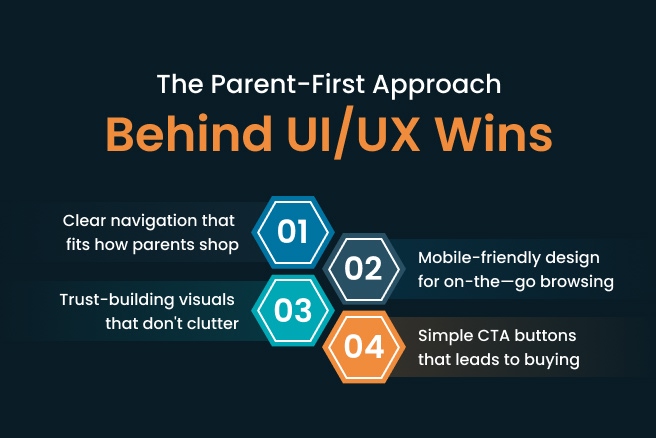
These UI/UX strategies are effective because they focus on solving real problems parents face when shopping online for baby products. Instead of generic design tips, they target what matters most to your audience (saving time, building trust, and making shopping effortless).

Parents today don’t have the patience to struggle through confusing websites or slow mobile pages. They want clear paths to products, quick checkouts, and reassurance that their purchases are safe. Good UI/UX delivers exactly.
parents approach

These strategies work because they’re grounded in understanding the unique mindset and needs of parents shopping for their little ones. When the experience feels tailored, smooth, and secure, parents buy, return, and tell others. This alignment between user needs and design is what makes these UI/UX strategies a winning formula for boosting your baby store’s revenue.

Conclusion

This blog has come to an end, but you can start improving your baby store’s website right away by applying these strategies. Instead of struggling with DIY fixes that may or may not work, getting help from an expert web designer can save you time and headaches.

ZealousWeb offers this kind of expertise without burning a hole in your pocket. They tailor UI/UX strategies that match your specific business goals, so you get results that matter. Schedule a call today and get a clear picture of what needs to be done to boost your store’s sales and create a better experience for your customers.

FAQs

How to measure the success of UI/UX improvements on my baby store website?

What common mistakes should be avoided in a baby store website design?

Can personalization improve sales on a baby eCommerce site?

What role does customer trust play in baby product eCommerce, and how can it?

How often should the baby store website’s design and functionality be updated?

Related Blog Posts

UX/UI design for baby ecommerce

The Role of UX/UI Design in Driving Growth and Customer Loyalty in Baby Ecommerce Stores

November 26, 2025
baby eCommerceeCommerce GrowthUser ExperienceUX/UI Design
baby product stores

Why Most Baby Product Stores Fail (And How to Avoid It)

November 25, 2025
baby eCommercebaby product store designeCommerce conversion optimizationtrust building for baby brands